
Browse the documentation
Conversions Log and Suspicious Conversions
Applies to: Tracker & affiliate users · Optional feature — available when your network has it switched on
The tracker's Conversions page shows every conversion that arrives on your offers, lets you hold bot-looking ones for review before they count, and lists the postbacks the ad server refused — with the reason.
What this is#
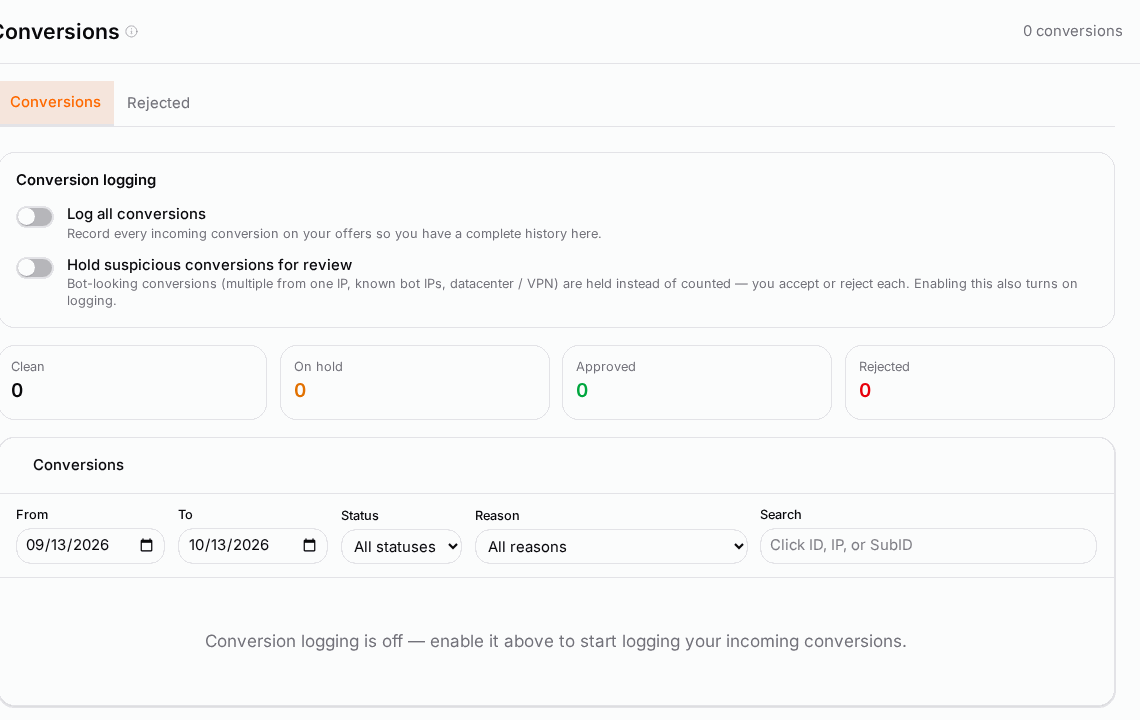
Conversions (tracker menu) has two tabs:
- Conversions — what was booked against your offers. Each row shows the Date, Click ID, Offer, Event, Tracking link, Reason, Status, Payout, IP and SubID. Expand a row with Show outbound postbacks to see every postback it fired onward (Time, Postback URL, Result) — the quickest way to check a conversion reached your traffic platform.
- Rejected — incoming postbacks the ad server refused to book, with the Reason, the Amount, the Type and the Click ID exactly as the sender wrote it. A broken postback template usually gives itself away here.
Two switches under Conversion logging decide what is recorded:
- Log all conversions — record every incoming conversion so you have a complete history on this page.
- Hold suspicious conversions for review — bot-looking conversions are held instead of counted, and you Accept or Reject each one. Turning this on also turns on logging.
A conversion is held for one of three reasons: Multiple conversions from one IP, Known bot IP or Datacenter / VPN traffic. You own the offer and the traffic, so the call is yours.
When you'll use this#
- You want proof of every conversion — to reconcile with an affiliate network or a client.
- You suspect fraud or bots inflating conversions and want them checked before they count.
- A network says it fired a postback but you don't see the conversion.
Step by step#
Turn on logging and holding#
- Open Conversions from the tracker menu.
- Under Conversion logging, switch on Log all conversions.
- To review suspicious ones first, also switch on Hold suspicious conversions for review.
From then on new conversions appear in the list. Logging is not retroactive.
Review held conversions#
- Filter Status to On hold.
- Look at the Reason, the IP, the SubID and the tracking link: one IP converting many times, or traffic from a datacenter, is usually not a real customer.
- Click Accept to book it, or Reject to drop it. Rejected conversions never count in your reports.
Find a missing conversion#
- Search the Conversions tab by Click ID, IP, or SubID. If it is there, expand it to see whether the outbound postback fired.
- If it isn't, open Rejected: the summary says how many postbacks weren't booked and what payout they carried, and each row gives the reason (see below).
Options reference#
Statuses#
| Status | Meaning |
|---|---|
| Clean | Logged; nothing suspicious. |
| On hold | Held for your review; not counted yet. |
| Approved | You accepted it. |
| Rejected | You rejected it; it doesn't count. |
| Processed | Flagged, but booked through the normal flow. |
Why a postback was rejected#
| Reason | What it means |
|---|---|
| Duplicate - same click already converted | The click already has a conversion of this kind. |
| Duplicate transaction ID | The same transaction ID arrived before (duplicate protection). |
| Click not found / No click ID supplied | The click ID is missing or doesn't match a click — usually a wrong macro in the network's postback template. |
| Campaign not found / Invalid tracking string | The click ID is malformed or belongs to something that no longer exists. |
| Invalid or deleted account / Postbacks blocked for this account | The account can't receive conversions. |
Filters: From / To dates (default: the last 30 days), Status, Reason and the search box.
Example#
Sara's sweepstakes offer suddenly converts twice as well overnight. She turns on holding. The next morning twelve conversions are On hold with Multiple conversions from one IP — all from two IP addresses on the same sub-ID. She rejects them and pauses that sub-ID's source. Her real conversion rate is back to normal, and her network never receives the fake events.
Tips#
- Leave logging on: it costs nothing and is your audit trail.
- Use holding on new or untrusted sources; review the queue daily.
- When a network reports more conversions than you, check Rejected first.
Troubleshooting#
| Symptom | Likely cause | Fix |
|---|---|---|
| The list stays empty | Log all conversions is off | Switch it on; only new conversions are logged. |
| A conversion is in the list but not at your traffic platform | No outbound postback fired, or it failed | Expand the row; fix the source's postback rows on Sources. |
| Many Click not found rejections | The network's postback template uses the wrong macro | Correct the click-ID macro in the network's postback URL. |
Related#
- Postbacks & Conversions — postback URLs, macros and destinations
- Traffic Sources and API Integrations — outbound postbacks per source
- Performance Reports — conversions in your reports
- How to receive conversions from an affiliate network