
Browse the documentation
Push Ads
Applies to: Publishers · needs the matching permission on your account
Web push turns your visitors into an audience you can reach again after they've left your site. Once someone allows notifications, you can earn from ads delivered to them — and send your own announcements — without them ever coming back.
What this is#
Push is four pages under the publisher menu:
| Page | What it's for |
|---|---|
| Push setup | Install the opt-in collector on your site so visitors can subscribe. |
| Push subscribers | Everyone who has opted in, plus reusable audience segments. |
| Push campaigns | Your own notifications, plus delivery rules that fill notifications from the ad auction. |
| Push stats | Impressions, clicks, CTR and revenue from auctioned pushes, and subscriber growth. |
There are two ways a notification gets sent, and they're worth keeping straight:
- Your own campaigns — you write the title, body and link and send it. Nothing is earned; it's your message.
- Delivery rules — a recurring, automatic push filled from the ad auction. This is where push revenue comes from.
When you'll use this#
- You want an extra revenue stream that doesn't take any space on your pages.
- You want to re-reach visitors who've already left.
- You want to announce something to your audience directly.
Step by step#
Set up the collector#
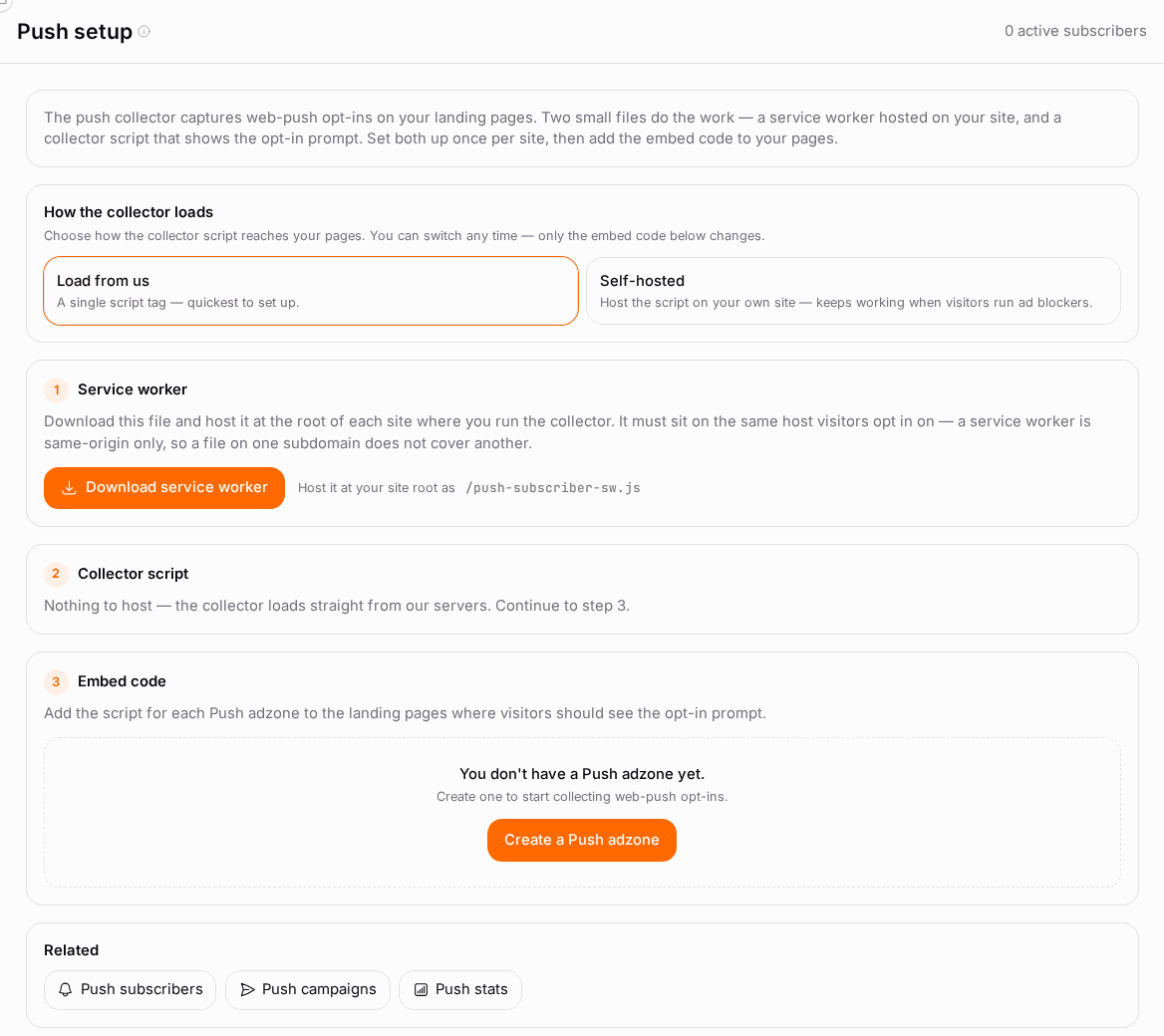
Two small files do the work: a service worker hosted on your site, and a collector script that shows the opt-in prompt.
- First, create a Push adzone — see Ad Zones and Ad Zone Types. Push setup builds its embed codes per Push adzone, so without one there's nothing to install.
- Open Push setup.
- Download the service worker and host it at the root of each site where you'll collect opt-ins. A service worker is same-origin only, so a file on one subdomain does not cover another — every host needs its own copy at its own root.
- Choose how the collector loads:
- Load from us — a single script tag. Quickest.
- Self-hosted — download the collector script and host it on your own site. Keeps working when visitors run ad blockers.
- Copy the embed code for each Push adzone and paste it onto the landing pages where the opt-in prompt should appear.
- Visitors now see the browser's permission prompt, and each one who allows it becomes a subscriber.
HTTPS only. Browsers won't register a service worker on an insecure origin, so push doesn't work on plain HTTP.
Build a segment#
- Open Push subscribers. The Segments panel is beside the subscriber list.
- Click to create one, name it, and set the criteria:
- Source — a specific traffic source, or any.
- Active subscribers only — exclude ones that have gone stale.
- Only subscribers with a click ID — subscribers you can attribute back to a click.
- Min / max age (days) — how long ago they opted in.
0means no limit.
- Save. The segment shows a live count of how many subscribers match right now.
Send your own notification#
- Open Push campaigns and click New campaign.
- Fill in:
- Campaign name — an internal label only you see.
- Notification title — required, shown bold at the top.
- Body, Icon URL, Image URL, Click URL — all optional.
- Save draft to keep working on it, or Send campaign to queue it.
- Once queued, it's fanned out to every active push subscriber. The list shows Sent and Failed counts, and you can Send again later.
Drafts are never delivered. Nothing goes out until you press send.
Set up a delivery rule (the revenue one)#
- Still on Push campaigns, find the Delivery rules panel.
- Click New rule and set:
- Rule name.
- Audience segment — a saved segment, or the whole audience.
- Run every (hours) — the cadence.
24= once a day,168= weekly. - Frequency cap (hours) — the minimum gap before the same subscriber gets another auctioned push.
0= no cap. - Max subscribers per run — a ceiling on reach per run.
0= no cap.
- Switch Active on to start delivering on that cadence, and use Pause / Resume later.
- Earnings from these appear on Push stats.
Options reference#
Collector load methods#
| Method | Pros | Cons |
|---|---|---|
| Load from us | One script tag, nothing to host, updates automatically. | Ad blockers can block it. |
| Self-hosted | Survives ad blockers. | You host and update the file yourself. |
Switching between them changes only the embed code — your subscribers are unaffected.
Segment criteria#
| Criterion | What it filters on |
|---|---|
| Source | The traffic source the subscriber came from. |
| Active subscribers only | Excludes subscribers whose browser no longer accepts pushes. |
| Only subscribers with a click ID | Subscribers who arrived via a tracked click. |
| Min / max age (days) | How long ago they opted in. 0 = no limit. |
Notification fields#
| Field | Required | Notes |
|---|---|---|
| Campaign name | Yes | Internal label. |
| Notification title | Yes | Shown bold at the top of the notification. |
| Body | No | The message. |
| Icon URL / Image URL | No | Upload a file or paste a URL. |
| Click URL | No | Where the notification opens when clicked. |
Delivery rule fields#
| Field | What it does |
|---|---|
| Audience segment | Who the rule reaches — a segment or the whole audience. |
| Run every (hours) | How often the rule fires. |
| Frequency cap (hours) | Minimum hours before the same subscriber is pushed again. 0 = no cap. |
| Max subscribers per run | Ceiling on reach per run. 0 = no cap. |
| Active | Whether the rule is delivering. |
Subscriber list#
| Column | What it shows |
|---|---|
| Captured / Last seen | When they opted in and were last active. |
| Source | Where they came from. |
| Click ID | The click they arrived on, if tracked. |
| Language / IP | Locale and address at opt-in. |
| Status | Active or inactive. |
You can export CSV, and bulk activate, deactivate or delete selected subscribers.
Push stats#
Push stats (publisher menu) shows how your auctioned pushes perform — the notifications your delivery rules fill from the ad auction. Your own manual notifications aren't counted here.
- The totals: Impressions, Clicks, CTR, Revenue and Active subscribers.
- Daily delivery — Impressions, Clicks and Revenue per Date.
- Subscriber growth — New subscribers per day, so you can see whether the collector keeps your list growing.
Use Window to look at the Last 7, 30, 90, 180 or 365 days.
Example#
Adding a push revenue stream. Dana runs a news site and wants push income without changing her page layout.
- She creates a Push adzone on her site.
- On Push setup she downloads the service worker and uploads it to
https://hernews.example/, picks Self-hosted for the collector (a lot of her audience runs blockers), and pastes the embed code into her article template. - Over two weeks she collects several thousand subscribers — visible on Push subscribers, and as a rising line on Push stats.
- She creates a segment "Active, under 30 days" — active only, max age 30 — so she reaches people while they still remember her site.
- She adds a delivery rule: that segment, run every 24 hours, frequency cap 20 hours, max 5,000 per run, and switches it Active.
- Revenue starts appearing on Push stats. She uses her own Push campaigns separately, maybe once a week, for actual editorial announcements.
Tips#
- Don't over-send. The frequency cap is the difference between a durable audience and a mass unsubscribe. Once a day is plenty for most sites.
- Ask at the right moment. Firing the permission prompt on first page load gets refused; asking after the visitor has engaged converts far better.
- Self-host the collector if a meaningful share of your audience uses ad blockers.
- Segment by age. Subscribers go stale; a "last 30 days" segment usually outperforms the whole list on both CTR and revenue.
- Keep your own campaigns rare. Every announcement you send competes with the auctioned pushes that actually earn.
- Check subscriber growth, not just totals. A flat growth line means the collector stopped working somewhere.
Troubleshooting#
| Symptom | Likely cause | Fix |
|---|---|---|
| No opt-in prompt appears | The collector isn't on the page, the site isn't HTTPS, or the service worker isn't at the site root | View the page source to confirm the script loads; check the worker file is reachable at the root of that exact host |
| Subscribers stay at zero | The service worker is on the wrong host or in a subdirectory | A service worker is same-origin only and must sit at the root — one copy per host |
| "No ad domain is configured for this account yet" | Your account has no ad domain, so the setup links can't be built | Contact support |
| A campaign shows a high Failed count | Those subscribers' browsers no longer accept pushes | Normal attrition — use the Active subscribers only segment criterion |
| Push stats show subscribers but no revenue | Push stats only count auctioned pushes; your own campaigns don't earn | Create a delivery rule and switch it Active |
| Subscriber growth flatlined | The collector was removed in a site redeploy | Re-check the embed code is still on your templates |
| A delivery rule never runs | It's paused, or its segment currently matches nobody | Check the Active toggle and the segment's live count |
Related#
- Ad Zones — creating the Push adzone this needs
- Ad Zone Types — where push fits among the formats
- Getting Your Ad Code — the general embed workflow
- Publisher Statistics — your earnings overall
- Earnings & Payouts — getting paid