
Browse the documentation
How to send conversions to Meta (Conversions API)
Applies to: Tracker & affiliate users · Optional feature — available when your network has it switched on
If you buy traffic on Facebook or Instagram, Meta's algorithm optimises better when it knows which of its clicks converted. This guide sets up a Meta / Facebook destination on your traffic source, so every conversion on that source is sent to Meta's Conversions API automatically.
Before you start#
- Conversions already come in for your offers — see How to receive conversions from an affiliate network.
- In Meta Events Manager you have your Pixel ID and a Conversions API access token (Events Manager → your pixel → Settings → Generate access token).
- Your Facebook traffic runs on a tracking link whose source uses the Facebook / Meta Ads template.
Steps#
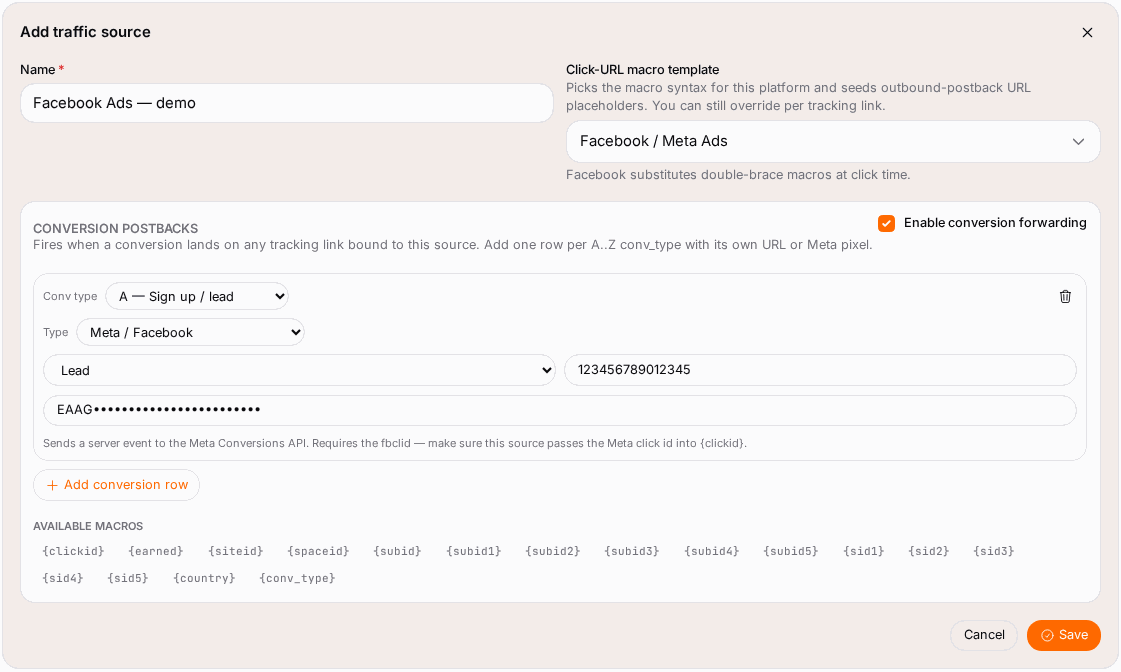
- Open Postbacks, tab Setup, and scroll to Traffic sources — outbound postbacks.
- On your Facebook source, click Edit.
- Tick Enable conversion forwarding.
- Click Add conversion row.
- Set Conv type to the letter you want to send, for example B (Sale).
- Set Type to Meta / Facebook.
- Enter the Pixel ID and the Access token.
- Pick the Event name: Purchase for sales and deposits, Lead for signups.
- Add a second row if you want to send another type too — for example A as Lead and B as Purchase.
- Click Save.
What is sent to Meta#
For each conversion of that letter on any tracking link of this source, the platform sends one server event with:
- the event name you picked, the time it is sent and
action_source = website; - the Meta click ID (
fbc), built from thefbclidparameter Meta adds to every click on your ad; - the conversion's value and currency.
Meta adds fbclid to your link by itself, so you don't need to add it. Just don't strip URL parameters in a redirect before the tracking link. If a click arrives without fbclid, the platform sends the link's clickid value instead, and Meta can't match that one.
Other ad platforms#
The same row editor sends conversions to other platforms. Pick the Type and fill the fields it asks for:
| Type | You need |
|---|---|
| TikTok Events API | Pixel code, access token, event name |
| Snapchat Conversions API | Pixel ID, access token, event name |
| Pinterest Conversions API | Ad account ID, access token, event name |
| Microsoft Advertising | Developer token, OAuth client ID / secret / refresh token, customer ID, account ID, offline conversion goal name |
| LinkedIn Conversions API | Conversion rule ID, OAuth client ID / secret / refresh token |
| Google Enhanced Conversions | Ads customer ID, conversion action ID, developer token, OAuth client ID / secret / refresh token, manager customer ID (optional) |
| URL | Any postback URL, with the macros listed under Available macros |
Each one needs that platform's own click ID (ttclid, gclid, msclkid…) to arrive in the clickid token of your tracking link, so use the matching source template.
Check it worked#
- On Postbacks, open the Log tab after the next conversion: each send shows OK or Failed.
- On Conversions, open a conversion and click Show outbound postbacks to see what was sent for it.
- In Meta Events Manager, the event appears under your pixel (server events), usually within an hour.
Troubleshooting#
| Symptom | Likely cause | Fix |
|---|---|---|
| Events reach Meta but never match a click | The click carried no fbclid (traffic not from Meta, or a redirect stripped it), so the clickid value was sent instead |
Send Meta traffic straight to the tracking link; check the source uses the Facebook template. |
| Nothing in the Log for a conversion | The click carried neither fbclid nor clickid |
Edit the tracking link and tick the clickid token. |
| Log shows Failed | Wrong pixel ID or expired access token | Generate a new token in Events Manager and paste it into the row. |
| Event arrives but Meta doesn't attribute it | The conversion came days after the click, or the click wasn't from a Meta ad | Normal for some conversions; check Meta's attribution window. |
| Row saved but never fires | The conversion's letter differs from Conv type | Use the same letter your affiliate network sends in conv_type. |