
Browse the documentation
Postbacks & Conversions
Applies to: Tracker & affiliate users · Optional feature — available when your network has it switched on
A conversion is the paid action a visitor completes after clicking your tracking link — a signup, a deposit, an install, a sale. Postbacks are how those conversions travel: an inbound postback tells the platform a conversion happened, and an outbound postback (or Conversions API event) forwards that conversion back to the ad network you bought the traffic from. This guide covers both directions, how to label your conversion types, and how to test everything.
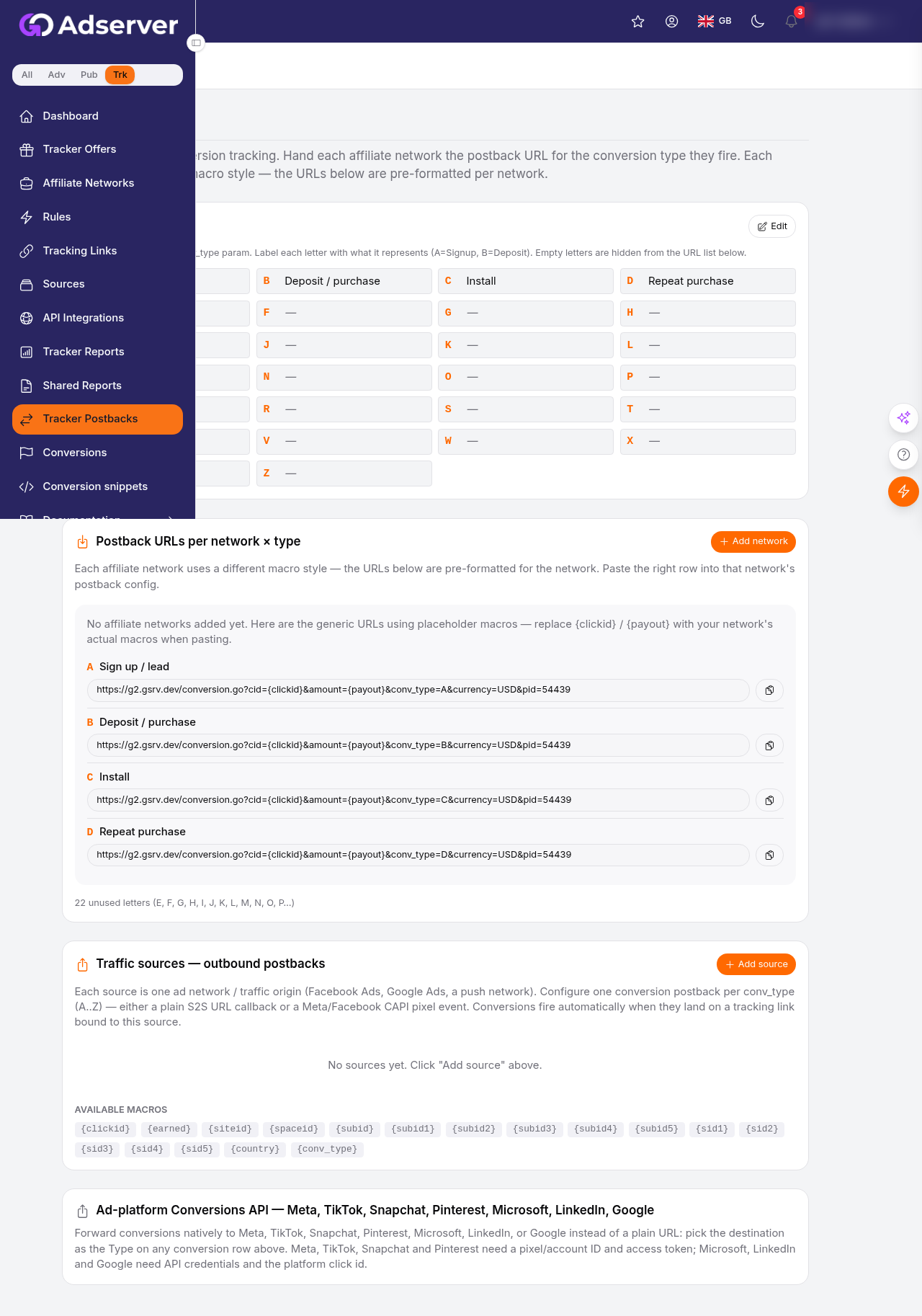
The Postbacks page — ready-made inbound postback URLs per conversion type, the outbound macro reference, and the Conversions API destinations (Meta, TikTok, Snapchat, and more).
What this is#
The Postbacks page has two halves:
- Setup — where you label your A–Z conversion types, generate the inbound postback URL you hand to each affiliate network, and configure the outbound forwarding per traffic source.
- Log — a running record of every outbound call the platform fired, with its result, so you can spot a broken destination.
Everything keys on the click ID: the identifier returned when your tracking link first fired. Inbound postbacks carry it so the platform knows which click converted; outbound postbacks carry the ad platform's own click ID so their algorithm knows which of their clicks converted.
When you'll use this#
- After you add a new affiliate network, to grab the inbound URL you paste into that network's postback settings.
- When you want the ad network (Meta, Google, TikTok…) to receive your conversions so it can optimise toward buyers.
- When a network can't fire server-to-server and you need a copy-paste pixel instead.
- Whenever conversions aren't showing up and you need to test the wiring.
Step by step#
A. Label your conversion types (A–Z)#
- Open Postbacks and stay on the Setup tab.
- Find the Conversion types editor. Each letter A–Z maps to the
conv_typevalue a postback carries. Label each letter with what it means for your offers — for example A = Signup, B = Deposit.
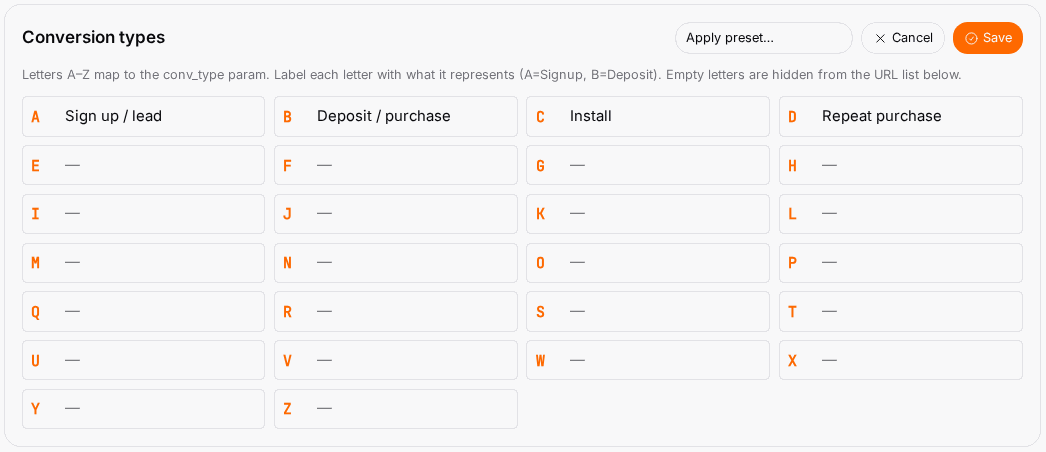
- To fill several at once, use Apply preset…:
- iGaming — Registration / FTD / Deposit / Bet / NGR / Chargeback.
- Affiliate — Signup / Sale / Lead / Install / Subscription / Refund.
Presets only fill empty slots, so applying one never overwrites labels you set yourself.
- Save. Each labelled letter now gets its own inbound postback URL below; empty letters are hidden.
B. Get the inbound postback URL for a network#
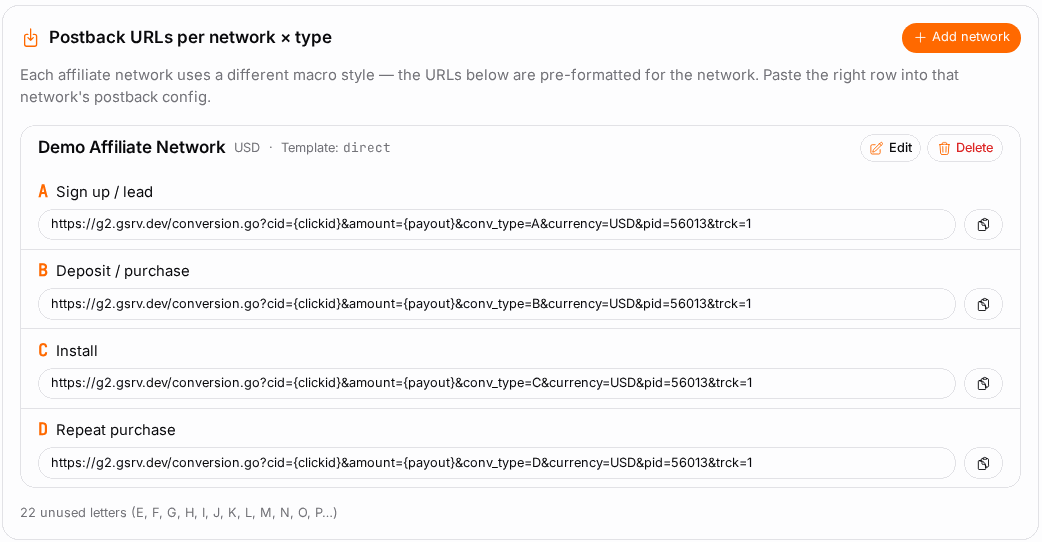
- Still on Setup, find the per-network postback URL for the affiliate network supplying the offer.
- The URL is already written in that network's macro dialect (single-brace, dollar-brace, and so on) based on the template you chose when you added the network. Copy it.
- Paste it into the network's postback / callback settings, one per conversion type where the network fires distinct events.
C. Configure outbound forwarding per source#
- Switch to the Sources area of the Setup tab. There is one card per traffic origin (Facebook, Google, a push network…).
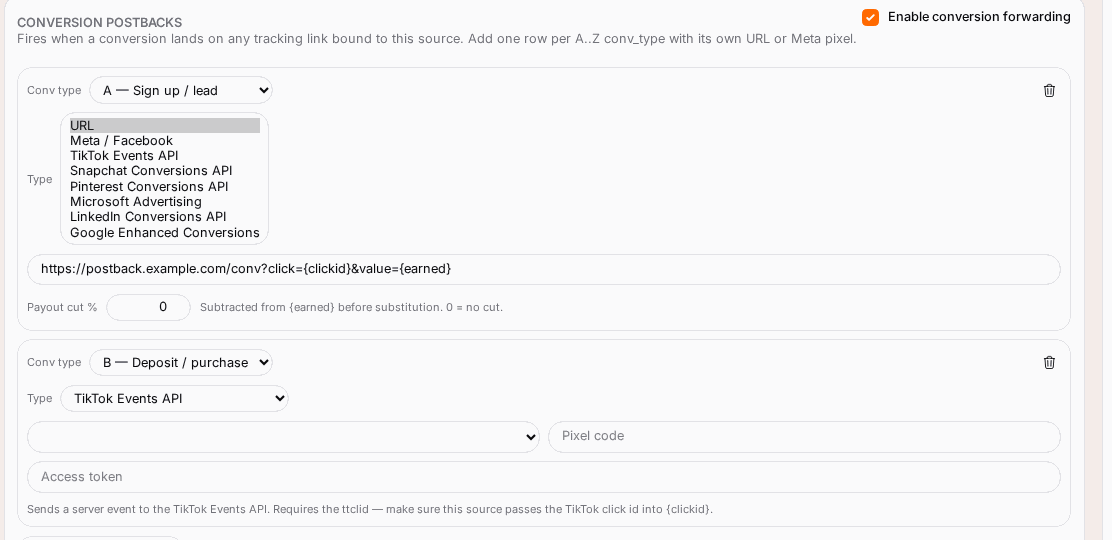
- On a source card, add one conversion row per conversion type you want to forward.
- Pick the destination Type for that row (plain URL, Meta, TikTok, Snapchat, Pinterest, Microsoft, LinkedIn, or Google — see the destinations table).
- Fill the fields that type asks for (pixel/account ID and access token, or the API credentials).
- Save. From now on, when a conversion of that letter lands on a tracking link bound to this source, the destination fires automatically.
D. Test it#
- Use the callback test to fire a real request at a postback URL with placeholder values and read back the HTTP status, confirming the endpoint accepts the call before live traffic depends on it.
- Check the Log tab after real traffic to see outbound calls and their OK / Failed status.
Options reference#
Inbound postback macros (server-to-server)#
These are the parameters the network substitutes into the inbound URL when it fires:
| Parameter | Required | What it carries |
|---|---|---|
Click ID (cid) |
Yes | The click identifier returned when your tracking link fired — ties the conversion back to the original click. |
Conversion type (conv_type) |
No | A single letter A–Z identifying which event fired. Defaults to A if omitted. |
Amount (amount) |
No | The revenue for this conversion, as a number. |
Currency (currency) |
No | Three-letter currency code. |
| Transaction ID | No | The network's own transaction ID. Where duplicate-conversion protection is on for your account, a postback that repeats a transaction ID already received is rejected as a duplicate. |
| Status | No | Accepted (pending / approved / rejected) but not used yet: every conversion that arrives counts, whatever its status. Don't rely on it to exclude rejected or charged-back conversions. |
| Event name | No | Free-text label for richer reporting beyond the A–Z letter. |
Date/time (date) |
No | Override for back-dated conversions (YYYY-MM-DD). |
The macro syntax (braces vs dollar-braces vs double-square) is set per network by its template — you don't hand-write it.
Outbound destinations (per conversion type, per source)#
| Destination | What it does | What you configure | Which click ID it needs |
|---|---|---|---|
| URL (S2S callback) | Fires a plain server-to-server GET to any URL | The URL, and optionally a percentage of the payout to pass through | Whatever your URL expects |
| Meta (Conversions API) | Sends the conversion to Facebook / Meta CAPI | Pixel ID, access token, event name | fbclid, carried in Click ID |
| TikTok (Events API) | Sends a server event to TikTok | Pixel code, access token, event name | ttclid |
| Snapchat (Conversions API) | Sends the conversion to Snapchat | Pixel ID, access token, event name | Snapchat click id |
| Pinterest (Conversions API) | Sends the conversion to Pinterest | Ad account ID, access token, event name | Pinterest click id |
| Microsoft Advertising | Uploads an offline conversion to Microsoft | Developer token, OAuth client ID / secret / refresh token, customer ID, account ID, offline conversion goal name | msclkid |
| LinkedIn (Conversions API) | Sends the conversion to LinkedIn | Conversion rule ID, OAuth client ID / secret / refresh token | li_fat_id |
| Google (Enhanced Conversions) | Uploads an offline click conversion to Google Ads | Customer ID, conversion action ID, developer token, OAuth client ID / secret / refresh token, optional manager/login customer ID | gclid |
For any of these to match on the ad-platform side, that platform's own click ID must be carried through your tracking link — so build the link with the Click ID token on and the correct source template (see Tracking Links).
Conversion snippets (client-side fallback)#
If a network can't fire a server-to-server postback, the Conversion snippets page generates a copy-paste alternative that hits the same conversion endpoint:
| Snippet | Use it when |
|---|---|
| 1×1 image pixel | Simplest; drop into any thank-you page. |
| 0×0 iframe | Works when <img> tags are stripped. |
| JavaScript beacon (fetch) | Async fire from a script. |
| Google Tag Manager tag | Custom-HTML tag inside GTM. |
Each snippet is pre-built with your conversion-type letter, the click-ID macro, revenue, and currency. There's a test-fire button that pings the endpoint with a placeholder click ID (so it confirms reachability without logging a fake conversion).
Example#
Set up a Signup + Deposit flow for an iGaming offer#
- Label the types. On Setup, Apply preset → iGaming. A becomes Registration, B becomes FTD. Save.
- Inbound. Copy the network's inbound URL for A (Registration) and for B (FTD) and paste each into the affiliate network's postback settings, so the network pings you when each event fires.
- Outbound to Meta. On your Facebook source card, add a row for conversion type A → Type Meta (Conversions API) → enter your Pixel ID, access token, and event name
Lead. Add a second row for B → event namePurchase. - Confirm the link. Make sure the tracking link feeding this source has Click ID on with the Facebook template, so Meta's fbclid rides along and CAPI can attribute.
- Test. Run the callback test on the inbound URL; watch the Log tab once real traffic flows.
Now a registration fires conversion A (logged, and forwarded to Meta as a Lead) and a first deposit fires conversion B (forwarded as a Purchase) — Meta's algorithm starts optimising toward depositors.
Tips#
- Keep your A–Z labels consistent across all your offers so reports read the same everywhere.
- Set the Amount on deposit / sale conversions so revenue and ROI are accurate, not just conversion counts.
- Use Transaction ID wherever the network supports it — it stops a re-fired postback from double-counting.
- Forward to the ad network (CAPI / offline conversions) for any channel with an optimising algorithm; it materially improves delivery over time.
- Test before you scale spend, not after conversions go missing.
Troubleshooting#
| Symptom | Likely cause | Fix |
|---|---|---|
| Network fires postbacks but nothing shows as converted | The inbound URL is missing the click-ID macro, or the network isn't substituting it | Re-copy the generated URL (it includes the right macro); confirm the network pastes it verbatim. |
| Callback test returns a failure / non-2xx | The network's endpoint rejected the placeholder call, or the URL is malformed | Re-copy the generated URL; check the network's postback settings accept your parameters. |
| Conversions log but the ad network (Meta/Google) never receives them | Wrong or missing click ID on the tracking link, or bad CAPI credentials | Rebuild the link with Click ID on and the correct source template; re-check the pixel/account ID, token, and event name on the destination. |
| Outbound Log shows Failed rows | Expired token or wrong credentials for that destination | Re-enter the access token / OAuth credentials on the source's conversion row. |
| $0 conversions appearing | The offer pays $0 for that event by design (free registrations, leads) | This is legitimate — free-registration offer types pay $0 on purpose. Check the conversion type before treating it as a problem; don't flag it. |
| Same conversion counted twice | The network re-fired the postback without a transaction ID | Add the Transaction ID macro so repeats de-duplicate. |
Related#
- Affiliate Networks — inbound postback URLs are generated per network
- Tracking Links — sources carry the outbound destinations; Click ID must be on
- Ad Spend & Cost Tracking — the other half of ROI
- Performance Reports — where conversions appear
- How to receive conversions from an affiliate network — step-by-step guide
- How to send conversions to Meta (Conversions API) — step-by-step guide