
Browse the documentation
How to create an API key and pull your statistics
Applies to: All users
An API key lets a script or reporting tool read your account without logging in. This guide creates a key that can only read statistics, locks it to your server, and makes a first request.
Before you start#
- You need to be the account owner, or a team member who has been allowed to create API keys. Other members see the key list as read-only.
- Know the IP address of the machine that will use the key (your server or office connection), if you want to lock it down — recommended.
Steps#
Turn on API access#
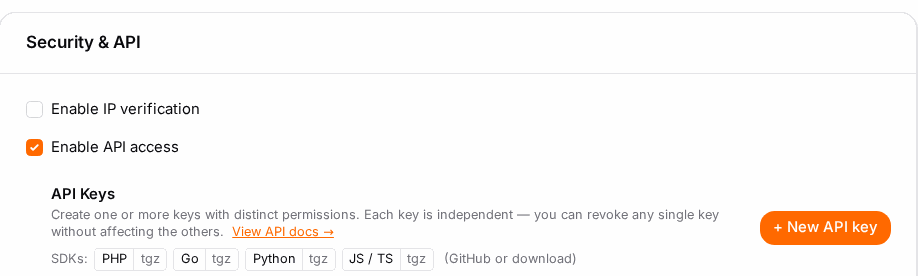
- Click your name in the top bar → Account, and open the Settings tab.
- In the Security & API card, tick Enable API access.
- Click Save at the bottom of the tab.
The API Keys list appears under the checkbox.
Create a key with only the scopes it needs#
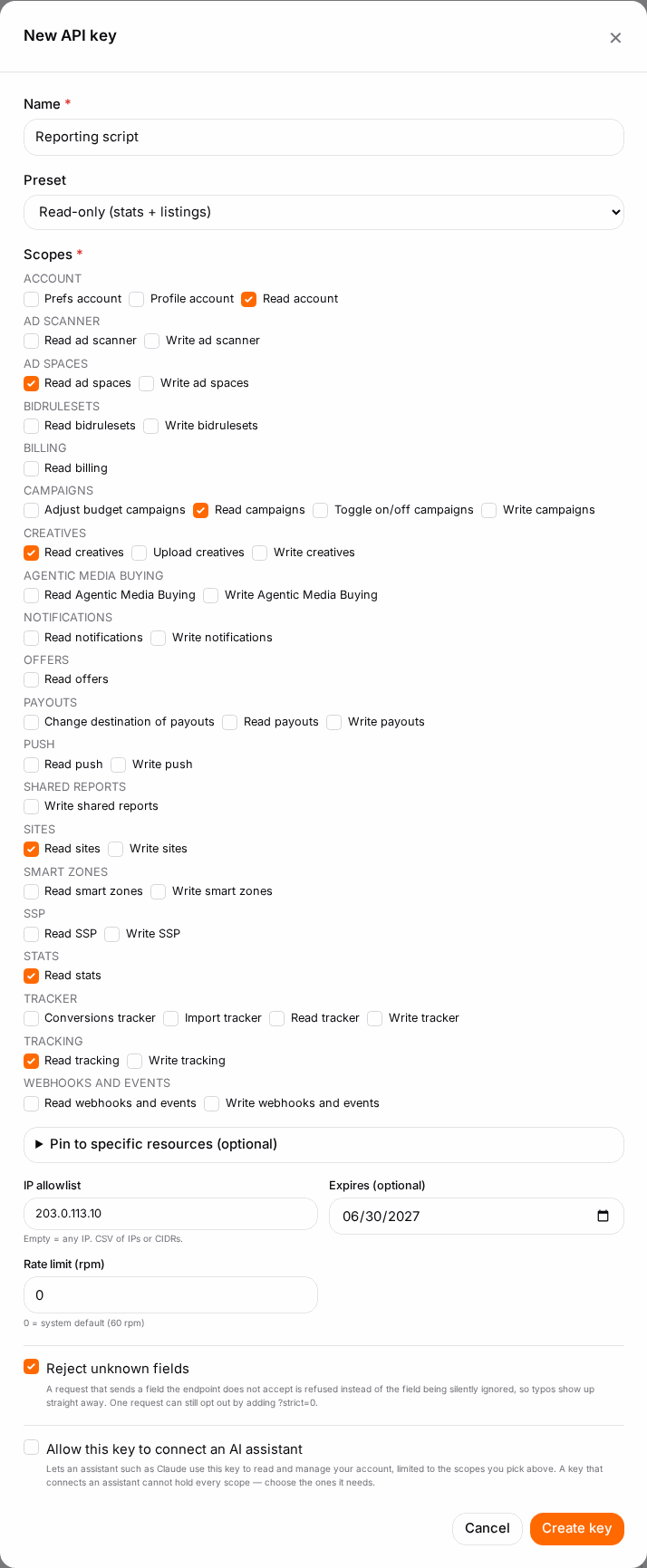
- Click New API key.
- Name — what the key is for, e.g. "Weekly report sheet". You'll recognise it later in the list.
- Preset — choose Read-only (stats + listings): read scopes only, nothing that changes anything. Custom (choose scopes) lets you tick scopes one by one.
- Optional — Pin to specific resources: under Campaigns, Sites or Adzones, click Browse and pick the ones the key may see. With no pins the key covers all of them.
- IP allowlist — enter the address(es) that may use the key, separated by commas (single IPs or CIDR ranges like
203.0.113.0/24). Empty means any IP. - Expires (optional) — pick a date for a key that should stop working on its own, e.g. a contractor's.
- Leave Rate limit (rpm) at
0(the default, 60 requests a minute) unless you have a reason to change it. - Click Create key.
Copy the key#
The Your new API key box shows the key. Click Copy and store it in a password manager (Show in the key list reveals it again). Treat it like a password: never paste it into chat, shared documents or committed code.
Pull your statistics#
Send the key as a bearer token. This asks for numbers per campaign over a date range (replace the host with your panel's address and the dates with your own):
curl -s "https://your-panel-host/api/v1/advertiser/stats?from=2026-10-01&to=2026-10-13&group_by=campaign&metrics=views,clicks,ctr,paid" \
  -H "Authorization: Bearer gas_live_YOUR_KEY"
The answer is JSON with rows (one per campaign, with campaign: {id, name} and your metrics) and totals. Money such as paid is in your account currency's main unit, not cents. Publishers use /api/v1/publisher/stats the same way. All dimensions, metrics and filters are in the API reference (View API docs → above the key list).
Check it worked#
- The request returns HTTP 200 with your campaigns in
rows. - In the key list, Last used and Calls update for the key.
Troubleshooting#
| Symptom | Likely cause | Fix |
|---|---|---|
| No API Keys list in Settings | Enable API access isn't ticked and saved, or your account isn't allowed API access | Tick it and Save; if the checkbox isn't there, ask your account manager |
| New API key missing, list says read-only | You're a team member without the right to create keys | Ask the account owner to create the key or allow you to |
401 Unauthorized |
Key missing, mistyped, revoked or expired | Send Authorization: Bearer <key>; check the key's status in the list |
403 naming a scope |
The key doesn't have that scope | Edit the key and add the scope, e.g. statistics read |
403 from a server that should work |
The request comes from an IP not in the allowlist | Add the server's public IP to IP allowlist |
429 Too Many Requests |
Over the rate limit | Slow down, or raise Rate limit (rpm) |
| Fewer campaigns than expected | The key is pinned to some campaigns | Edit the key and clear or extend the pins |
Related#
- API Keys — everything about keys, rotation and keeping them secret
- How to connect your AI assistant — use a key from Claude
- Advertiser Statistics — the same numbers in the panel
- How to send account events to Slack or your own system — get pushed instead of polling