
Browse the documentation
How to set up an in-video zone
Applies to: Publishers
The In-Video Plugin puts ads inside your own video player: a video before the content (preroll), a banner overlay while it is paused, during it (midroll) or after it (postroll), and optionally a pop when the viewer presses play or close. It does not serve ads itself. It plays the ads of other zones on the same site, which you choose per moment.
Use it when you run your own player on the page. If your player can request ads from a VAST URL by itself, a plain video preroll zone is simpler.
Before you start#
Create the zones the plugin will play, all on the same website:
- A Video Ads zone for the preroll (see How to set up a video preroll zone).
- An In-Video Banner zone for overlays on pause, midroll or postroll, if you want those.
- A Pop Ads zone, only if you want a pop on play or close.
The plugin's Ad spot lists only show the Video Ads and In-Video Banner zones of the website you pick, so create those first.
Steps#
- Open Adzones and click New Ad Zone.
- Enter Name your ad zone (for example "Player controller"), choose In-Video Plugin under Adzone Type, and pick the same site under Select your website.
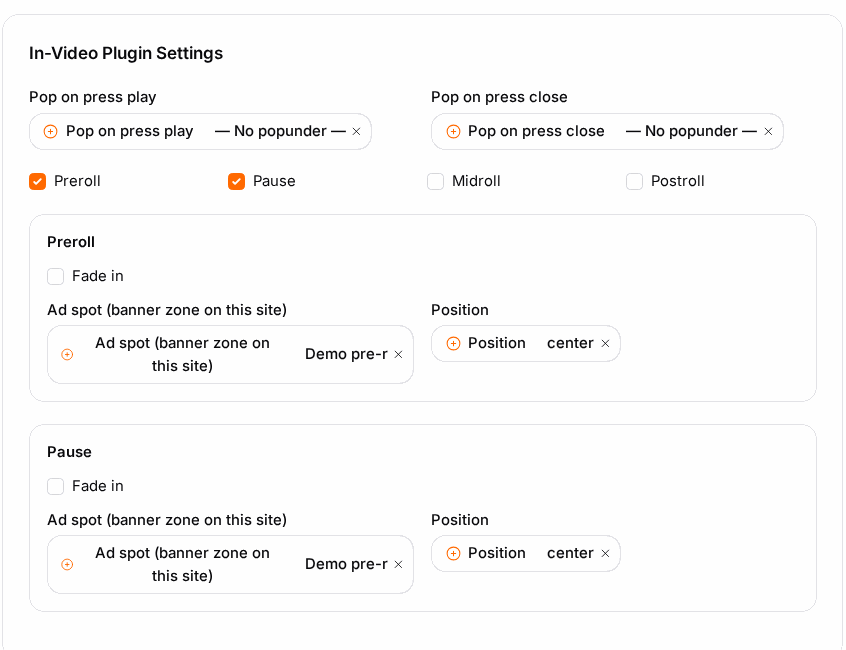
- In In-Video Plugin Settings, switch on the moments you want: Preroll, Pause, Midroll, Postroll.
- For each moment you switched on:
- Ad spot (banner zone on this site): the zone whose ads play at that moment, for example your Video Ads zone for Preroll.
- Position: where an overlay appears on the player (top-left to right-bottom, or center).
- Fade in: let the overlay fade in instead of appearing at once.
- Optional: under Pop on press play and Pop on press close, choose a Pop Ads zone, or leave — No popunder —.
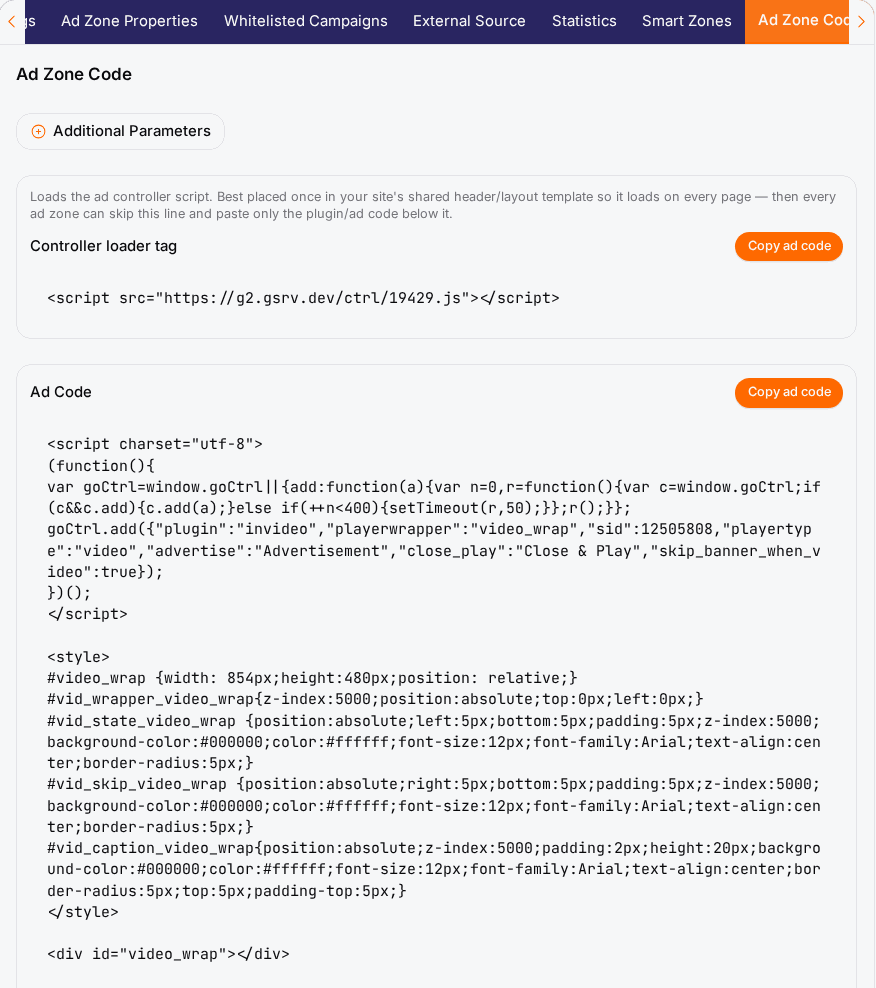
- Click Save, then open the Ad Zone Code tab and click Copy ad code.
Put the code around your player#
The code has three parts: a style block, a video_wrap div and a script.
- Put the
video_wrapdiv around your existing player element. - Keep its
idthe same in three places: the div, the style block, and theplayerwrappervalue in the script. - Set
playertypein the script to the player you use:video(HTML5 video element),jwplayer,ktplayerorflowplayer. If your player is available as a JavaScript variable, you can pass it asplayerinstead. - Paste the style block and script on the same page. If the Controller loader tag is already in your site template, you can leave that line out.
You can change the style block freely to fit your design; it only styles the ad wrapper and its captions.
Check it worked#
- Open the page with ad blockers off and press play: the preroll plays first when a video campaign is available.
- Pause the video: the pause overlay appears in the position you chose.
- The next day, the Statistics tab of the zones you selected as ad spots shows the views.
Troubleshooting#
| Symptom | Likely cause | Fix |
|---|---|---|
| The Ad spot list is empty | No Video Ads or In-Video Banner zone exists on the chosen website. | Create those zones on the same website first. |
| Nothing happens on play | The video_wrap div is not around the player, or its id differs from playerwrapper. |
Wrap the player and use the same id in all three places. |
| The overlay sits in the wrong place | Position for that moment. | Change Position and save, then reload the page. |
| Preroll plays, overlays never do | The overlay moments point to a zone with no campaigns. | Pick a different ad spot or check that zone's statistics. |
| It works with one player, not another | playertype does not match the player on that page. |
Set the right playertype in each page's copy of the script. |