
Browse the documentation
Bid Rules
Applies to: Advertisers · Optional feature — available when your network has it switched on
Bid rules let one campaign bid different amounts under different conditions instead of using a single flat bid. You build an ordered list of rules; for each incoming request, the first rule whose conditions match supplies the bid. If no rule matches, the campaign sits that request out.
What this is#
A bid ruleset is a named, reusable list of rules. Each rule combines:
- A set of conditions the request must satisfy (geo, device, OS, browser, zone, domain, carrier, language, hour).
- A bid value to use when it matches.
- An optional timezone for the rule's hour window.
Rules are walked in priority order, top to bottom. The first match wins and supplies the bid — so the order of your rules is your strategy. Bid rules only change what you bid; which ad serves once you win the auction is unaffected. Bid rules apply to RON and RTB campaigns whose pay type is CPC or CPM, where the feature is enabled for your account. They are not RTB-only — the Use bid rules toggle renders on the Basic Settings step of a RON campaign on the same terms. They do not apply to CPA, flat or managed campaigns.
When you'll use this#
- When one flat bid is leaving money on the table — you'd pay more for your best geo/device/time, less for the rest.
- To bid a premium for peak hours or high-value placements and a floor for everything else.
- To reuse one tuned bidding strategy across several similar campaigns and adjust it in one place.
Step by step — creating a ruleset#

- Open Bid Rulesets from the menu and click Create.
- Enter a Name, choose the Pay type (
cpc,cpm, orother) — it must match the campaign you'll attach it to — and set the Default timezone (leave it on Inherit from tenant unless you're deliberately running to a specific market's clock). - Add your first rule and fill in its conditions and bid (see below).
- Add more rules, then drag them into priority order — most specific/highest-value at the top, broadest at the bottom.
- Optionally end with a broad catch-all rule (no conditions) as a floor bid.
- Save.
Step by step — attaching a ruleset to a campaign#
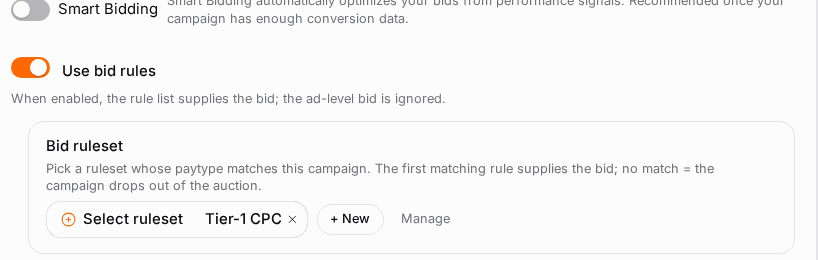
- Open an eligible campaign for editing — RON or RTB, pay type CPC or CPM.
- Turn on Use bid rules.
- Pick a ruleset — the picker only shows rulesets whose pay type matches the campaign.
- The ad-level bid input is now disabled; the ruleset supplies the bid.
- Save. Turning the toggle off returns the campaign to its normal bid.
Options reference#
Ruleset fields#
| Field | What it does |
|---|---|
| Name | A label for your own reference. |
| Pay type | cpc, cpm, or other. Must match the campaign's pay type at attach time. |
| Default timezone | The timezone used for hour conditions unless a rule overrides it. Inherit from tenant uses the network default. |
Per-rule conditions#
Each condition is optional — leave it empty to mean "any". A rule matches only when all its set conditions are satisfied (an AND).
| Condition | Matches on |
|---|---|
| Country / region | The visitor's location. Selecting a country matches all its regions and cities. |
| Operating system | The visitor's OS. |
| Browser | The visitor's browser. |
| Device | The visitor's device type. |
| Zone (include) | Only these placements. |
| Zone (exclude) | Everything except these placements. |
| Domain (include) | Only these domains (by ID from your reports). |
| Domain (exclude) | Everything except these domains. |
| Carrier / connection type | Mobile carrier or connection. |
| Language | Visitor's language. |
| Hour range | An hour window (e.g. 18 → 3 wraps past midnight), resolved in the rule's timezone. |
Include and exclude can be mixed in the same rule.
Per-rule extras#
| Field | What it does |
|---|---|
| Bid | The amount to bid when this rule matches. The unit label adapts to the ruleset's pay type ($X CPM / $X CPC). |
| Timezone override | Resolve this rule's hour window in a specific timezone, overriding the ruleset default. |
| Notes | Free text for your own bookkeeping. Not used at serve time. |
Rule order and priority#
Because the first matching rule wins, ordering is everything. Put your most specific, highest-value rules at the top and your fallbacks at the bottom. A broad rule with no conditions at the very bottom acts as a catch-all floor — it claims any traffic the specific rules didn't.
If you leave out a catch-all, requests that match no rule are simply skipped (no bid). That's fine when you only want to bid on specific traffic — just know it's the behaviour.
Example ordering#
Rule 1  state=CA   device=iPhone   hour 18:00-03:00   bid $0.75
Rule 2  any state  device=iPhone   hour 18:00-03:00   bid $0.65
Rule 3  any state  device=Android  hour 18:00-03:00   bid $0.65
Rule 4  any                                            bid $0.35   (catch-all floor)
A California iPhone request in the evening matches Rule 1 and bids $0.75. Other evening iPhone traffic falls to Rule 2. Evening Android traffic hits Rule 3. Everything the upper rules didn't claim lands on Rule 4 at $0.35.
Timezone and daylight saving#
Hour conditions resolve in a timezone chosen in this order, first one wins:
- The rule's own timezone override.
- The ruleset default timezone.
- The network default (when both above are left on Inherit).
Leave both on Inherit from tenant unless you're deliberately running to a specific market's clock — that's the recommended path and it just works for most advertisers. When you do set a real timezone (e.g. America/Los_Angeles), daylight-saving shifts are handled by that timezone automatically, so an "evening" window stays evening across the DST change — you don't need to re-edit the hours twice a year. Setting a raw fixed offset instead of a named zone would not follow DST, so prefer named zones.
Worked example — a peak-hours ruleset#
Amanda runs a CPM RTB campaign and wants to pay a premium when her audience is most active, a floor otherwise. She builds one CPM ruleset:
Rule 1  state=CA   device=iPhone   hour 18-03 PST   bid $0.75
Rule 2  any state  device=iPhone   hour 18-03 PST   bid $0.65
Rule 3  state=CA   device=iPhone   hour 03-18 PST   bid $0.55
Rule 4  any state  device=iPhone   hour 03-18 PST   bid $0.45
Rule 5  any state  device=Android  hour 18-03 PST   bid $0.65
Rule 6  any                                          bid $0.35   (catch-all floor)
She sets the ruleset's default timezone to America/Los_Angeles so every "PST" window is correct year-round. She attaches it to her campaign, and the ad-level bid disappears — the ruleset now drives every bid. In reporting she can see, per rule, how much each one spent.
Reporting and tuning#
Rule-driven traffic is stamped so you can see, per ruleset and per rule, how much spend, impressions and fill each rule produced. You can also filter your statistics by ruleset or rule.
Tuning playbook#
- Let it run a few days so each rule collects data.
- Read the per-rule report. If your catch-all floor (bottom rule) is eating most of the volume, your specific rules are too narrow or under-bidding — widen their conditions or raise their bids.
- If a premium rule barely fires, its conditions are too tight; loosen one dimension.
- If spend is high but results are weak on a rule, lower that rule's bid or add an exclude (zone/domain) condition to it.
- Re-order so the rules that earn move up; retire rules that never match.
- Change one thing at a time and re-check — small, deliberate adjustments beat sweeping rewrites.
Tips#
- Always end with a catch-all if you want to keep bidding on traffic the specific rules don't claim; otherwise unmatched requests are skipped.
- Keep the specific, high-value rules at the top and the broad floor at the bottom.
- Reuse one ruleset across similar campaigns and tune it in one place. The editor warns you when a ruleset is attached to more than one active campaign, so you know a change is cross-campaign.
- Don't over-build. Start with 3–4 rules (premium, mid, floor) and add detail only where the data justifies it.
- Leave timezone on Inherit unless you have a specific market clock in mind.
Troubleshooting#
| Symptom | Likely cause | Fix |
|---|---|---|
| Campaign isn't bidding at all | No rule matches the incoming traffic and there's no catch-all. | Add a broad catch-all floor rule at the bottom. |
| One rule "steals" traffic you meant for another | A broader rule sits above a more specific one, so it matches first. | Re-order: move the specific rule above the broad one. |
| The floor rule eats most of the volume | Your specific rules are too narrow or under-bidding. | Widen their conditions and/or raise their bids. |
| The ruleset isn't selectable on the campaign | Its pay type doesn't match the campaign's pay type. | Create/pick a ruleset with the matching pay type (cpc for CPC, cpm for CPM). |
| Hour windows fire at the wrong local time | The timezone isn't what you expected. | Set the ruleset (or rule) timezone to a named zone for the target market. |
| Editing a ruleset changed other campaigns | The ruleset is shared across campaigns. | Clone it first if you want a change to affect only one campaign. |