
Browse the documentation
How to use dynamic parameters (tokens and macros)
Applies to: Tracker & affiliate users · Optional feature — available when your network has it switched on
Dynamic parameters are placeholders the platform fills in per click or per conversion: {tracking} becomes the click ID, {country} the visitor's country, and so on. You use them in three places, and each place has its own set. This guide lists the real ones and shows how to use them.
Before you start#
- Know which place you're filling in:
- A tracking link — the URL you give the ad network. Built in Tracking Links.
- A landing URL — the offer's or campaign's destination URL. The platform fills these macros when it sends the visitor there.
- A postback — inbound (the network tells you about a conversion) or outbound (you tell the ad network).
- Macros are case-sensitive. Copy them exactly.
Steps#
1. Tracking links: tick the tokens you need#
- In Tracking Links, open the builder (New tracking link) or Edit a link.
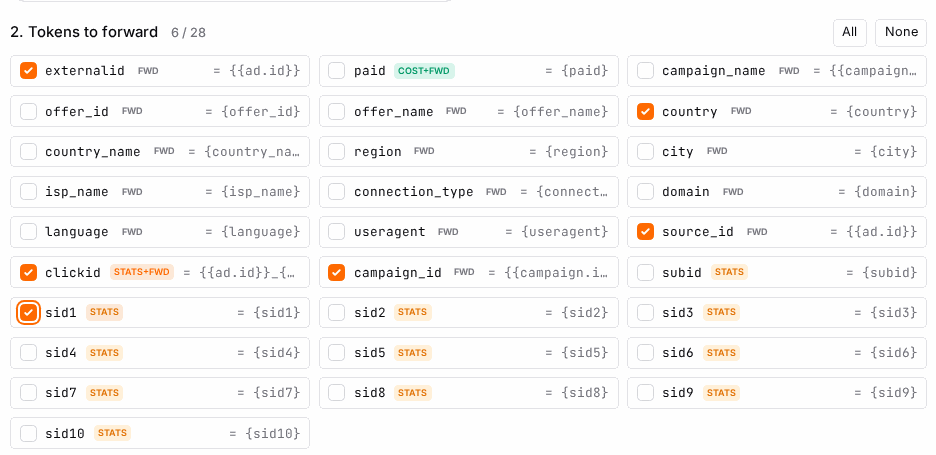
- Under 2. Tokens to forward, tick the tokens. Each becomes a parameter on the link, in the ad network's macro syntax (from the source template).
| Token | Carries |
|---|---|
clickid |
The ad network's click ID — needed for conversion matching and Conversions API. On by default. |
source_id |
The placement / ad / zone the click came from. On by default. |
externalid |
The click ID under the name many offer networks expect. On by default. |
campaign_id, campaign_name |
The ad network's campaign. |
offer_id, offer_name |
Your offer. |
country, country_name, region, city |
Visitor location. |
language, useragent, isp_name, connection_type, domain |
Visitor browser, network and the site they came from. |
paid |
What the network charged for the click, where it reports it. |
subid, sid1 … sid10 |
Your own sub-IDs. Logged in your stats only — they are not passed on to the offer. Name them under Settings so reports show your names. |
Every other token is passed on to the offer's URL. If the source template has no macro for a token, the link carries {tokenname} and the platform fills it from the click itself.
2. Landing URLs: put macros where the destination expects them#
Add macros to the offer's or campaign's URL. Both {name} and [name] work.
https://offer.example.com/?click={tracking}&country={country}&src={spaceid}
| Macro | Becomes |
|---|---|
{tracking}, {click_id}, {trackingid} |
The platform's click ID — the one the offer must send back in its postback. |
{cid} |
The traffic source's own click ID, passed in on the click. |
{campaignid} / {campaign_id}, {campaign_name} |
The campaign. |
{adid} / {ad_id}, {creative_id}, {creative_name}, {ad_title}, {headline} |
The ad and creative shown. |
{spaceid} / {source_id}, {zone_name}, {siteid}, {domain}, {pid} |
The ad zone, its name, the website, its domain and the publisher. |
{subid}, {sid1} … {sid10} |
Sub-IDs carried on the click. |
{country}, {country_name}, {region_name}, {city_name}, {lang} |
Visitor location and browser language. |
{device_type}, {device_name}, {os_name}, {os_type_name}, {browser} |
Visitor device and software. |
{ip}, {ipnum}, {ispid}, {uvid} |
Visitor IP, numeric IP, ISP and a visitor ID. |
{keywords}, {categories}, {position}, {bansize} |
Matched keywords, categories, position and banner size. |
{paid} / {cost} |
The cost of the click. |
{timestamp} |
Time of the click. |
{creative_pool_id}, {urlpool_id}, {urlpool_adid} |
The creative or URL pool used. |
{ab_detected} |
1 if an ad blocker was detected, else 0. |
3. Postbacks#
Inbound — the URL you give an affiliate network (/conversion.go). The network fills its own macros into these parameters: cid (your click ID, required), conv_type (A–Z), amount, currency, date, event_name and subid6 … subid10. pid is your account and is already filled in. See How to receive conversions from an affiliate network.
Outbound — a URL row on a source under Postbacks → Setup → Traffic sources — outbound postbacks. The platform fills these:
| Macro | Becomes |
|---|---|
{clickid} / {tracking} |
The ad network's click ID from the original click. |
{earned} |
The conversion's payout (minus the Payout cut % if you set one). |
{conv_type} |
The conversion type as a number: 0 = A, 1 = B, … |
{siteid}, {spaceid} |
Your source and tracking link. |
{subid}, {sid1} … {sid5} (also {subid1} … {subid5}) |
Sub-IDs from the click. |
{country} |
Visitor country. |
https://push-network.example/postback?clickid={clickid}&payout={earned}
Check it worked#
- Tracking link: open it in a browser and look at the offer URL you land on — the values should be real, not
{…}. - Landing URL: same test. A macro still in braces isn't supported in that place.
- Postbacks: the Log tab on Postbacks shows each outbound URL with the values filled in.
Troubleshooting#
| Symptom | Likely cause | Fix |
|---|---|---|
A literal {…} arrives at the offer |
Macro not supported there, or misspelled | Use one from the tables above for that place. |
sid1 never reaches the offer |
subid and sid1–sid10 are stats-only on tracking links |
Use another token, such as externalid, to pass a value on. |
Outbound postback sends conv_type=0 |
Types are numbered from 0 | 0 is A, 1 is B. |