
Browse the documentation
Ad Zone Types
Applies to: Publishers
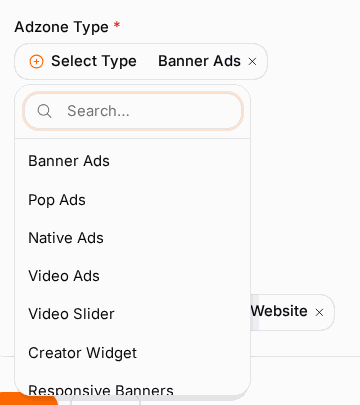
When you create an ad zone you pick a type, and that choice decides the format of ads it serves — a banner, a native block, a pop, a video, and so on. The type is fixed once the zone is created, so it is worth choosing the right one up front. This page is a catalogue of every format with plain-language guidance on where it fits and how it feels to your visitors.
What this is#
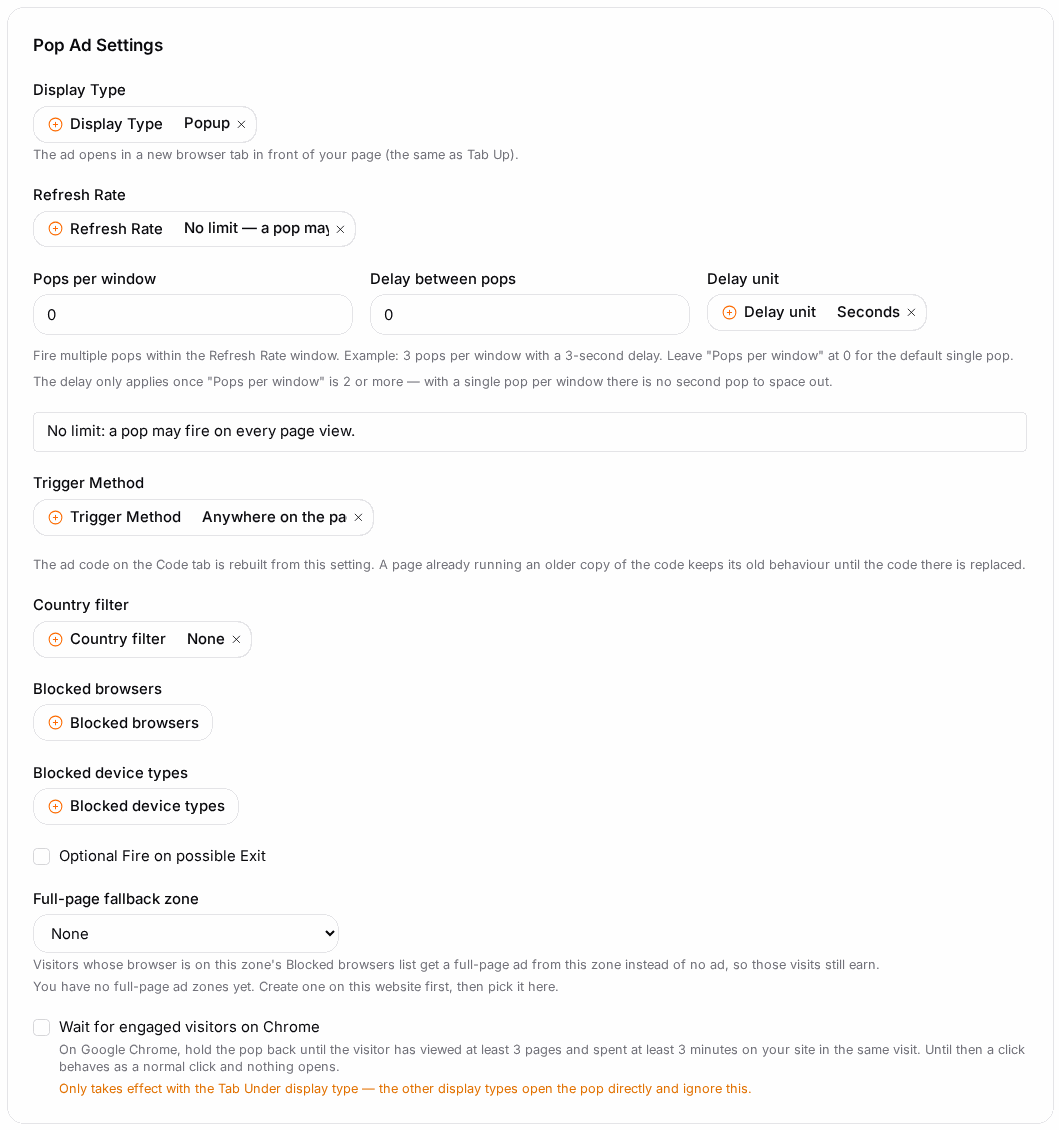
An ad zone type is essentially the shape of the ad. Two zones on the same page can look and behave completely differently depending on their type: one might be a quiet 728×90 banner in your header, another a full-screen interstitial between pages, another a silent pop-under. Each type also exposes its own settings (size, position, timing, country filters) on the zone's Settings tab.
The exact list available to you depends on your account and the network's configuration — not every type is enabled everywhere.
When you'll use this#
- Before creating a zone, to decide which format suits a given placement.
- When you want higher earnings from a slot and are weighing a more impactful format.
- When a format is affecting your visitor experience and you want a gentler alternative.
How to choose a type#
Match the type to where the placement sits and how intrusive you're willing to be. As a rule of thumb:
- Gentle, blends in, lower earnings per view → Banner, Native, Text.
- Noticeable but not blocking → Native Bar, Floater, Video Slider, Webpush, In-Message.
- High impact, higher earnings per view, more disruptive → Pop, Interstitial, In-Player Video.
- You send traffic elsewhere / promote offers → Redirect, Smartlink.
- You have your own video player → VAST.
A quick decision aid:
| If the placement is… | And you want… | Start with |
|---|---|---|
| A fixed slot in your layout (header/sidebar/in-article) | Steady, unobtrusive display revenue | Banner |
| Inside an article feed or content list | Ads that match your page's look | Native |
| A persistent strip at the top/bottom of the page | Always-visible, low-footprint promotion | Native Bar |
| Anywhere, and you can accept a pop | Maximum revenue per view | Pop |
| A video player you control | In-stream video revenue | Video or VAST |
| Between page views or actions | A big, high-value moment | Interstitial |
| A page where you route users onward | To monetise redirected traffic or CPA offers | Redirect / Smartlink |
Type catalogue#
| Type | Best for | Visitor experience | Notes |
|---|---|---|---|
| Banner | Standard display slots (header, sidebar, in-content) | Familiar and unobtrusive; sits in the page flow | Fixed banner size chosen at creation; the most common and widely supported format. |
| Native | Blending ads into content feeds and article bodies | Looks like part of your content | Styleable to match your site; configurable rows, columns, and image sizes. |
| Native Bar | A slim promoted-content strip fixed to the top or bottom | Persistent but small; stays out of the way | Docked bar with a set number of items; good for low-footprint promotion. |
| Text | Text-only link units | Lightest touch; no images | Useful where creatives must stay minimal or bandwidth is tight. |
| Pop | Pop-under / pop-up monetisation | Intrusive; opens a separate window | High revenue per view; supports refresh timing and country filtering. Use sparingly. |
| Video | In-player video ads (pre-, mid-, post-roll) | High impact inside your video player | Player options include skip time, capping, and country filtering. |
| InPage Video | Auto-playing video inside the article flow | Noticeable; sits in the content, not a player | Refresh timing configurable; good where you have no video player. |
| Video Slider | A small video that slides into a page corner | Present but dismissible | Includes a close button and display timing; less intrusive than full-screen video. |
| VAST | Serving to external/third-party video players | Depends on your player | Delivers a VAST tag your player requests; use when your player "speaks" VAST. |
| Interstitial | Full-screen ad shown between page views or actions | Very high impact; briefly blocks the page | Available as banner, native, or video interstitial variants. Use at natural breaks. |
| Floater (a Banner display mode) | An ad that floats over content in a fixed position | Always visible while scrolling | Not a separate type: a Banner zone with the floating display type. Position and margins configurable. See Banner ad zones. |
| Webpush (Native Webpush) | Push-style notification promotions on the page | Notification-styled, on-page | Docked format with configurable position and item count. |
| IM (In-Message) | In-message / in-app messenger-style placements | Fits chat/messenger layouts | Supports reload timing and a close control. |
| Redirect | Sending traffic to an offer or destination by rule | Visitor is routed onward | Filters by country, device, and connection type before redirecting. |
| Smartlink | Aggregating multiple CPA offers behind one zone | Visitor lands on a matched offer | Automatically routes each visitor to a matching offer; see Offers. |
Every type has its own page with all its settings — see the Ad formats section of this manual.
If you don't see a type you expect, it may not be enabled for your network. The available list is exactly what appears in the Type dropdown when you create a zone.
Placement and earnings guidance#
- Above-the-fold banners (visible without scrolling) generally earn more than ones lower down, because they get more viewable impressions.
- Native tends to earn well and keep visitors happy because it matches your content — a good default for content sites.
- Pops and interstitials pay the most per action but cost you in user experience; too many can raise bounce rates and annoy visitors. Use frequency/refresh timing to keep them reasonable.
- Video (in-player or VAST) usually carries the highest CPMs of all, but only makes sense where you actually have video content or a player.
- Floaters and sliders are a middle ground: more visible than a static banner, less disruptive than a pop.
- Fill matters as much as format. A high-impact format that rarely fills can earn less than a well-placed banner that fills every time. Watch fill and eCPM in Publisher Statistics after launch.
After you pick a type#
- Each type reveals its own settings on the zone's Settings tab — size for banners, position and timing for pops/floaters/sliders, player options and country filters for video, and so on.
- Configure those settings, then Save.
- Collect the placement's embed code from Getting Your Ad Code and add it to your site.
- After it's live, review fill and eCPM per format in Publisher Statistics and adjust.
Example#
A content blog. Priya runs a recipe blog. She uses a Banner in the header for steady baseline revenue, a Native block inside each article so ads match her recipe cards, and one Video Slider in the corner for video demand — deliberately avoiding pops to keep readers happy. She reviews eCPM per type weekly and finds Native earns the most while keeping bounce rate low.
A download/streaming site. Marco's traffic tolerates more aggression, so he adds a Pop (with country filtering and a sensible refresh time) plus an Interstitial between page loads for high-value moments, and keeps a Banner as reliable baseline fill.
Tips#
- Decide type before creating the zone — it can't be changed afterward.
- Start gentle, then add higher-impact formats one at a time and watch the effect on both earnings and bounce rate.
- Prefer Native on content sites: it usually balances revenue and experience best.
- For video revenue without your own player, try InPage Video; with a player, use Video or VAST.
- Use each type's country filters and timing to cap how often intrusive formats fire.
Troubleshooting#
| Symptom | Likely cause | Fix |
|---|---|---|
| The type you want isn't in the dropdown | It's not enabled for your network. | Contact support to ask whether the format can be enabled. |
| Chose the wrong type | Type is fixed after creation. | Create a new zone with the right type and swap the embed code. |
| A pop/interstitial fires too often | Refresh/frequency timing is too aggressive. | Raise the refresh time and add country filtering in the zone's Settings tab. |
| Video zone won't play ads | Player mismatch, or your player doesn't request the tag. | For third-party players use the VAST type and give the player its VAST tag from the Code tab. |
| High-impact format earns less than expected | Low fill for that format on your traffic. | Compare eCPM and fill by type in statistics; keep a banner as reliable baseline. |
Related#
- Ad Zones — creating and configuring the zone itself.
- Websites — the property each zone lives in.
- Getting Your Ad Code — the snippet for each format.
- Offers — CPA offers used by Smartlink and Redirect zones.
- Publisher Statistics — comparing formats by fill and eCPM.
- Push Ads — setting up the opt-in collector behind Push zones.
- Smart Zones — filling a zone from outside networks.
- How to set up a video preroll zone and get its VAST URL — step-by-step guide
- How to set up an in-video zone — step-by-step guide
- Banner ad zones — settings for this format
- Native ad zones — settings for this format
- Video ad zones — settings for this format
- Pop, tabs and IM pop-up ad zones — settings for this format
- Interstitial and full page ad zones — settings for this format
- Redirect, mail click and click zones — settings for this format
- Hardlinks ad zones — settings for this format
- Skin ad zones — settings for this format
- Footer code ad zones — settings for this format
- Text ad zones — settings for this format