
Browse the documentation
How to split-test landing pages with a URL pool
Applies to: Advertisers · Ad manager and ad network setups only, when the network has the module switched on
At the end of this guide your campaign's clicks are spread over several landing pages in the proportions you choose, and you can see which landing page converts best — without duplicating ads or campaigns. For every option, see Creative & URL Pools.
Before you start#
- An advertiser account with URL Pools in the menu.
- Two or more landing page URLs.
- A campaign with at least one ad. See How to create your first campaign.
- To rank landing pages by conversions: a tracking pixel (conversion type) under Tracking. See Conversion Tracking & Retargeting.
Steps#
Create the pool#
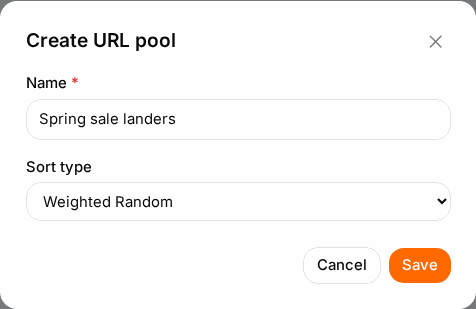
- Open URL Pools and click New pool.
- Enter a Name and pick the Sort type:
- Weighted Random — clicks are split by the weight you give each URL. The usual choice for a split test.
- Random — an even split; weights are ignored.
- CR (Conversion Rate) — favours the landing page that converts best. Choose the conversion under Tracking pixel.
- Save.
Add the landing pages#
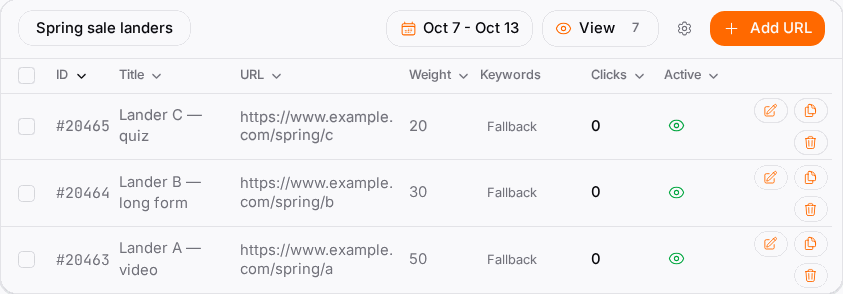
- Click the pool to open it, then click Add URL.
- Enter the Destination URL. You can use the same macros as in an ad's destination URL — the list is under Available Macros.
- Give it a Title so the stats table is readable, e.g. "Lander B — short form".
- With Weighted Random, set the Weight: equal weights mean an equal split; 30 against 10 sends three times as many clicks to the first.
- Leave Keywords empty unless you route by keyword (see How to target by keywords). A URL without keywords is the pool's fallback.
- Save, and repeat for each landing page.
Use the pool in your ads#
- Open the campaign's Ads step and edit an ad (or create a new one).
- In URL pool, pick your pool. The ad's own destination URL is no longer used — the pool decides.
- Save the ad. To switch many ads at once, select them in the list and use Change URL Pool.
Check it worked#
- In URL Pools, Used in lists the campaign.
- After a day or two, open the pool and use Toggle stats: clicks, conversions and conversion rate per landing page.
- In Statistics, View Details → By URL Pool Item compares them alongside your other numbers.
- When a clear winner emerges, raise its Weight — every ad using the pool follows immediately.
Troubleshooting#
| Symptom | Likely cause | Fix |
|---|---|---|
| One landing page gets every click | Sort type is CR and it took an early lead | Switch to Weighted Random until you have enough conversions |
| The Weight field is missing | The sort type isn't Weighted Random | Change the sort type in the pool's settings |
| "No tracking pixels configured" | No conversion types exist yet | Create one under Tracking first |
| A URL never gets clicks | It's inactive, or it has keywords no request carries | Check its Active switch and its Keywords |
| Need to change a domain in every URL | — | Use Search & replace in URLs, and check the preview before confirming |