
Browse the documentation
Connected Ad Networks
Applies to: Publishers · needs the matching permission on your account
What this is#
You can connect your own accounts at outside ad networks to the platform, so it can talk to those networks for you through their API. There are two places, for two different jobs:
| Page | Menu | What the connection is for |
|---|---|---|
| Ad Networks | Publisher | Your advertiser account at a traffic network where you buy traffic for your ad zones (ExoClick, Adsterra, PropellerAds and others, or another GoAdserver network). The platform reads your cost, checks your balance, and can pause, resume and adjust the campaign there — the basis of Agentic Media Buying. |
| Smart Networks | Advertiser | Your publisher account at a network whose zone code you run as an ad (SmartAds): the network's code competes with other ads, and the platform pulls the network's earnings per placement to book them and rank the ad. |
Both keep your credentials (an API key, or username and password, or client ID and secret, depending on the network) encrypted, and both can pull statistics from the network.
When you'll use this#
- Ad Networks: you buy traffic on another network and send it to your ad zones, and you want cost, balance and automatic control in one place.
- Smart Networks: you want a network's own ads to compete for your traffic as a SmartAd, earning what that network pays.
Step by step#
Connect a traffic network (publisher → Ad Networks)#
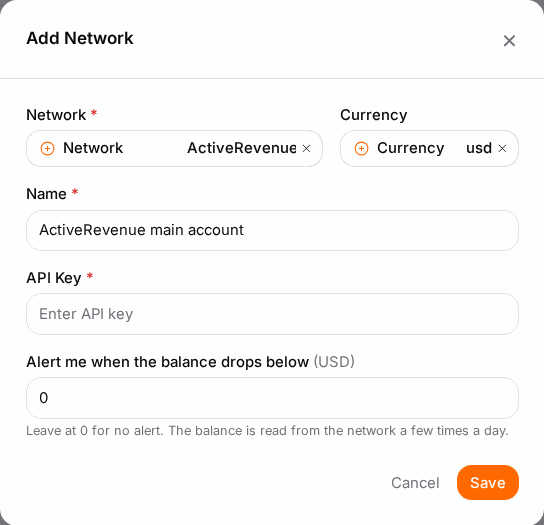
- Open Ad Networks in the publisher menu and click Add Network.
- Choose the Network. Only networks available on your account are listed; if the list is empty, contact support.
- Enter a Name you'll recognise and the Currency your account at the network uses.
- Fill in the credentials the network asks for: API Key, Email, Username/Password, Network User ID or Client ID/Client Secret. For another network on our platform, also pick Which ad network — the network where you buy — and use an API key of your advertiser account there.
- Tick Pull Stats to import the network's statistics.
- Optionally set Alert me when the balance drops below: you get an alert when your balance at the network falls under that amount. The balance is read from the network a few times a day; 0 means no alert.
- Keep Active on and Save.
The Networks tab lists your connections with their Network, Currency, Status and current Balance. The API Reports tab is the log of every call the platform made to a network on your behalf — the Space ID and Campaign ID involved, the Message or Error, the Time and whether it was a Success or Failed. Delete Selected Reports and Purge All Reports clear the log.
Connect a network for SmartAds (advertiser → Smart Networks)#
- Open Smart Networks in the advertiser menu and click Add Network.
- Choose the Network; only networks that report earnings per placement are offered, because SmartAds need that to book revenue.
- Enter a Name, an optional Prepend Name (shown before the name in lists) and the Currency.
- Enter the credentials (API Key, Username/Password, Network User ID or Client ID/Client Secret) and tick Pull Stats.
- Save. The network can now be picked when you create a SmartAd: an ad whose content is the network's zone code. The ad must carry the placement macro so earnings come back per placement.
Use the status toggle to pause a connection and Delete to remove it.
Options reference#
| Field | Meaning |
|---|---|
| Network | Which outside network this account is at. |
| Name / Prepend Name | How the connection is shown in your lists. |
| Currency | The currency of your account at the network. |
| API Key, Username, Password, Network User ID, Client ID, Client Secret | The credentials that network's API needs. |
| Pull Stats | Import the network's statistics regularly. |
| Alert me when the balance drops below | Low-balance alert for a traffic network (Ad Networks only). |
| Active | Paused connections are not used. |
Example#
Ana buys pop traffic on Adsterra for her ad zones. On Ad Networks she adds her Adsterra advertiser account with its API key, ticks Pull Stats and sets a low-balance alert at 100. She links her pop zone to the Adsterra campaign in the zone's media-buying settings. From then on the zone shows what each Adsterra placement cost and earned, she's warned before her Adsterra balance runs dry, and API Reports shows every pause and resume the platform sent.
Tips#
- Use a separate API key for the platform, so you can revoke it without touching other tools.
- When calls start failing, check API Reports first: an expired key shows up there immediately.
Troubleshooting#
| Symptom | Likely cause | Fix |
|---|---|---|
| "No networks are available on this account" | No network integrations are enabled for you | Contact support. |
| Balance stays empty | Wrong credentials, or the network doesn't report balances | Re-enter the key; check API Reports for errors. |
| API Reports full of Failed calls | Expired or revoked key, or the network's API is down | Renew the key on the network and update the connection. |
| A network is missing in Smart Networks | It can't report earnings per placement, so it can't run SmartAds | Use it in a smart zone instead. |