
Browse the documentation
How to receive conversions from an affiliate network
Applies to: Tracker & affiliate users · Optional feature — available when your network has it switched on
When a visitor from your tracking link signs up or buys at the offer, the affiliate network has to tell the platform. It does that with an inbound postback: a URL the network calls for each conversion, carrying the click ID you sent it. This guide sets that up and tests it, including NATS programs.
Before you start#
- The offer is under Tracker Offers and you send traffic to it with a tracking link that has the
clickidtoken ticked. - You know the network's two macro names: the one that echoes back your click ID, and (optional) the one for the payout amount. Their documentation or support has them.
Steps#
- Open Affiliate Networks and click Add network. Enter the network's Name, pick its Template if it's in the list (MaxBounty, CrakRevenue, ClickDealer and many more), set the Payout currency and save. Pick Direct / generic if your network isn't listed.
- Open Postbacks and stay on the Setup tab.
- Under Conversion types, label the letters you'll use, for example A = Signup and B = Sale. Apply preset… fills common sets (Affiliate or iGaming) into empty letters only. Save.
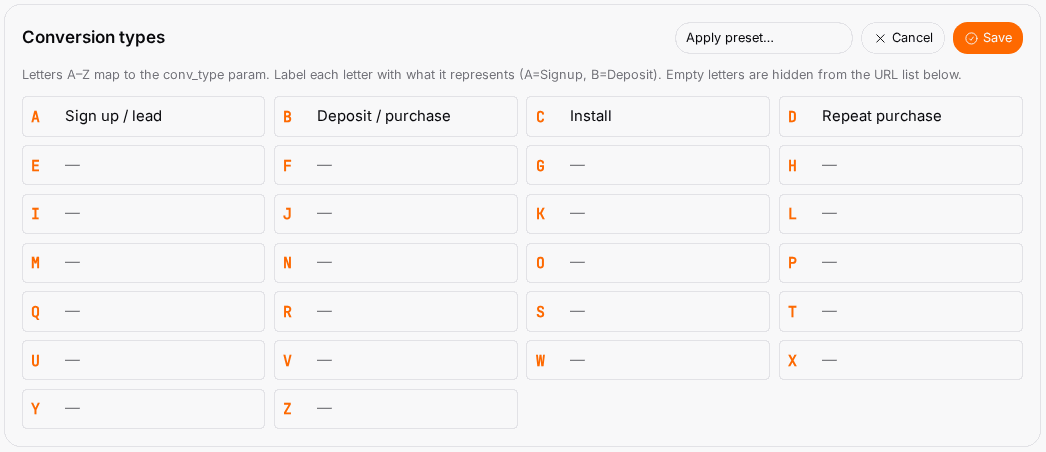
- Under Postback URLs per network × type, find your network and copy the URL for each letter. It looks like this:
https://<your tracking domain>/conversion.go?cid={clickid}&amount={payout}&conv_type=A¤cy=USD&pid=12345&trck=1
- If you picked Direct / generic, replace
{clickid}and{payout}with your network's own macro names. A listed template already has them. - In the network's panel, paste the URL into its postback (callback / S2S) setting — one URL per conversion type if the network fires separate events.
What the parameters mean#
| Parameter | Required | Carries |
|---|---|---|
cid |
Yes | Your click ID, echoed back by the network. Ties the conversion to the click. |
conv_type |
No | Letter A–Z. Defaults to A. |
amount |
No | The payout for this conversion. Without it, the conversion counts at 0. |
currency |
No | Three-letter code, e.g. USD. |
pid |
Yes | Your account ID — already filled in. Don't change it. |
date |
No | Back-date a conversion (YYYY-MM-DD). |
event_name |
No | Free-text label shown with the conversion. |
subid6 … subid10 |
No | Per-conversion labels; they override those slots for this conversion. |
txid (transaction ID) rejects a repeated conversion when duplicate-conversion protection is on for your account — ask your account manager if you need it. status is accepted but not used yet: every conversion that arrives counts.
NATS programs#
There is no ready-made NATS template. Use Direct / generic and do this:
- Add your click ID to the NATS link in your offer (or landing page) as a passthrough parameter — for example
nats_at[subscription_passthrough1]=followed by your click ID. Check the exact parameter name with your NATS program. - In the postback URL, replace
{clickid}with the NATS macro that returns that passthrough, and{payout}with its amount macro. - Ask the program's support to confirm both macro names; they differ between NATS setups, so we can't list them for you.
Check it worked#
- Ask the network to fire a test postback, or open the URL in your browser with a real click ID from a recent click.
- Open Conversions: the conversion appears there (tick Log all conversions if logging is off). A postback the ad server refused shows under the Rejected tab with the URL exactly as the network sent it — the quickest way to spot a macro the network didn't fill.
- The conversion also shows in Tracker Reports for that offer.
Troubleshooting#
| Symptom | Likely cause | Fix |
|---|---|---|
| Nothing arrives | The network didn't save or fire the URL | Re-paste it and ask the network for its postback log. |
Postback under Rejected, with cid={clickid} or another literal macro in its URL |
The network doesn't know that macro name | Replace it with the network's own click-ID macro; make sure your link passes clickid to the offer. |
| Conversions show with 0 revenue | amount missing or left at 0.00 |
Put the network's payout macro in amount. |
| Counted twice | The network fired the same postback twice | Pass the network's transaction ID as txid and ask your account manager to switch on duplicate-conversion protection; or have the network send each conversion once. |