
Browse the documentation
How to target by keywords
Applies to: Advertisers
At the end of this guide your campaign only runs on ad requests that carry one of your keywords — for example only on pages about "poker" or "casino". It's how one ad zone can show different campaigns depending on the topic of the page, without creating an ad zone per topic.
Before you start#
- An advertiser account on a network that has keyword targeting switched on. If Keyword Targeting doesn't appear on your campaign's Advanced step, ask your account manager.
- A RON campaign or a direct deal. Keyword targeting isn't available on RTB or flat-rate campaigns.
- Your keywords, agreed with the publisher if you don't manage the ad zones yourself.
How a request gets its keywords#
The ad server collects the keywords of every ad request from:
- the
keywordsvalue in the ad zone's code, which the publisher can set per page, and - the page title, when the ad zone is loaded through the ad controller.
A campaign with keywords serves only when at least one of its keywords is in that collection. A campaign without keywords keeps serving everywhere as usual.
Steps#
Set keywords on the campaign#
- Open the campaign (Edit) and go to the Advanced step.
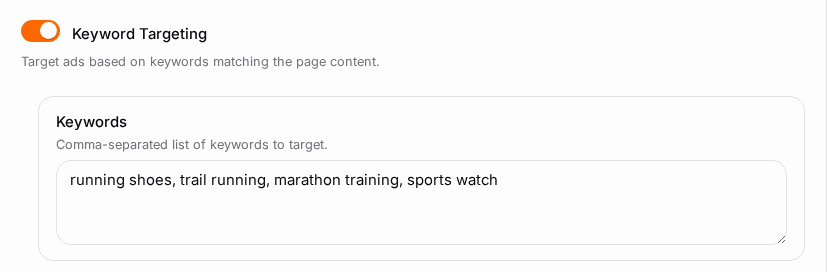
- Turn on Keyword Targeting.
- In Keywords, enter your keywords separated by commas, e.g.
poker, casino, slots. - On a direct deal you also get Excluded Keywords: the deal never serves on a request carrying one of these, even if it also carries an included keyword.
- Save the campaign.
Make sure the ad requests carry them#
If you also manage the ad zones (or can ask the publisher), add the keyword to the ad zone's code on the pages where it applies:
- Ad controller code — add a
keywordsparameter to the zone'sadd()call, e.g.keywords: "poker". See Ad Controller (Advanced). - Iframe code — append
&keywords=pokerto the iframe URL, after the zone ID. See Getting Your Ad Code.
Several keywords are separated by commas.
Check it worked#
- Open a page that carries one of your keywords: your campaign is now one of the candidates there.
- In Statistics, group by Adzone or Domain: views should come only from the zones and sites that send your keywords.
- Pages without your keywords never show this campaign — that's expected.
Troubleshooting#
| Symptom | Likely cause | Fix |
|---|---|---|
| The campaign stopped serving after adding keywords | No ad request carries any of them | Check the ad zone code for a keywords value, or remove keyword targeting |
| Keyword Targeting isn't on the Advanced step | Not enabled on your network, or the campaign is RTB or flat-rate | Ask your account manager; use a RON campaign |
| The campaign shows on unrelated pages | A broad keyword also appears in page titles | Use more specific keywords |
| A direct deal ignores the include list | Both keyword lists are empty, so targeting stays off | Fill in Keywords |
| An excluded keyword still matches | Exclusion works on direct deals only | Use a direct deal, or narrow your included keywords |
Related#
- Targeting & Filters
- How to set up a direct deal
- How to split-test landing pages with a URL pool — URL pools can also send each keyword to its own landing page
- How ad selection works