
Browse the documentation
How to add an impression tracking pixel
Applies to: Advertisers
At the end of this guide your own (or your client's) tracking system is called every time one of your ads is shown, so you can count impressions independently and compare them with the platform's statistics. The tracking URL is loaded alongside the ad as an image pixel; your ad's landing page doesn't change.
Before you start#
- An advertiser account and a RON campaign with at least one ad. Impression tracking isn't available on other campaign types.
- Your network must have impression tracking switched on for the ad type. If you don't see Use Impression Tracking in step 3, it's off — ask your account manager.
- The tracking URL from your tracking system — usually a pixel URL ending in something like
/imp?....
Steps#
Open the campaign (Edit) and go to its Ads step.
Edit the ad you want to track (or click New Ad for a new one).
Tick Use Impression Tracking. On video ads the field is called Impression Tracking URL.
Paste your tracking URL into Impression Tracking URL.
Add macros so your tracker knows which impression it is. Click the chips under the field to insert them, e.g.:
https://tracker.example.com/imp?campaign={campaignid}&ad={adid}&zone={spaceid}&country={country}&ts={timestamp}The full list is in Ads & Creatives under "Destination URLs and macros". Sub-ID macros
{sid1}–{sid10}work here too.Click Save.
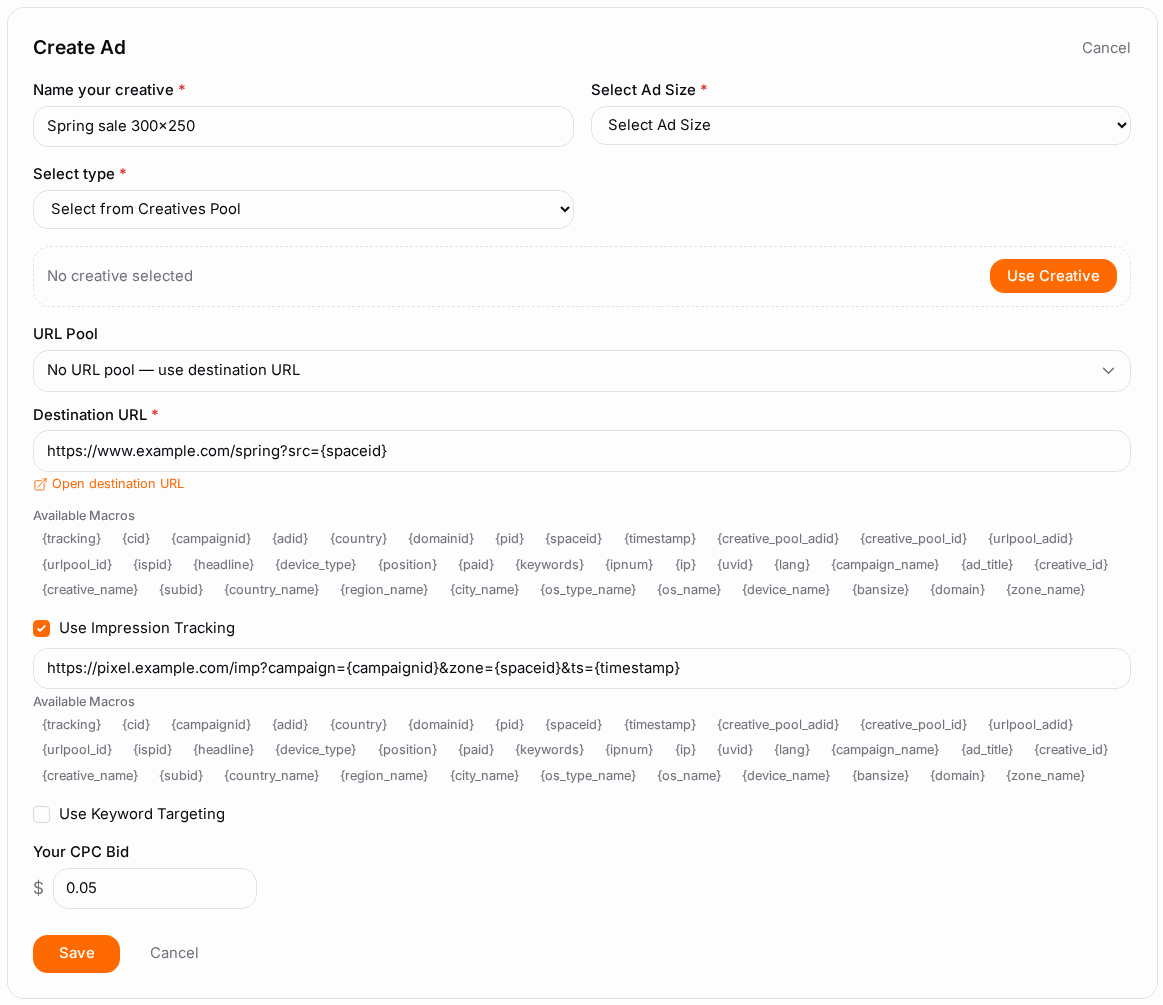
- Repeat for every ad you want tracked. Impression tracking is set per ad, not per campaign.
Check it worked#
- Load a page where the ad shows (or wait for live traffic) and look in your tracking system: impressions should start to arrive within minutes.
- Compare your tracker's count with Statistics for the same ad and day. Small differences are normal — ad blockers, and visitors who leave before the pixel loads. Larger gaps usually mean a URL or macro problem.
Troubleshooting#
| Symptom | Likely cause | Fix |
|---|---|---|
| Use Impression Tracking isn't on the ad form | Not a RON campaign, or not enabled for this ad type on your network | Use a RON campaign; ask your account manager |
| Not offered on a native ad with HTML code | HTML creatives run their own code | Put your pixel inside the HTML code instead |
| Your tracker receives nothing | Typo in the URL, or your tracker refuses requests without HTTPS | Open the URL in a browser to test it; use an https:// URL |
Values arrive literally as {campaignid} |
The macro is misspelled | Insert macros with the chips instead of typing them |
| Your tracker counts far fewer impressions | Your tracker is slow or blocked by ad blockers | Check its response time; compare by ad and day |
Related#
- Ads & Creatives — every ad field and the macro list
- How to create your first campaign
- How to read your campaign statistics