
Ad Formats
All of our Ad formats
Every ad zone type, in one ad server
GoAdserver has more than 35 ad zone types, including newer web formats from interscroller to offerwall. Publishers create a zone, choose its type and paste one embed code; advertisers buy the same formats on CPM, CPC, flat-rate or RTB. Each network decides which types it offers: see the white-label ad network and the ad manager. See every format live in our demos, and publish the same demo pages in your own panel.
Display and native
- Banner ads: every standard size, as an image, video, HTML or iframe creative. See the live demo.
- HTML5 rich media: animated, interactive banners uploaded as a .zip; the ad server hosts them and counts every click through the IAB clickTag. How it works · live demo.
- Dynamic banners: a shop’s product feed turned into banners in every size, kept up to date, showing visitors the products they viewed. How it works · live demo.
- Interscroller: a tall banner seen through a window in your article as the reader scrolls. How it works · live demo.
- In-image ads: a closeable banner strip over the photos in your articles, matched to each photo. How it works · live demo.
- Sticky anchor and side rails: banners that stay in view without covering your content. How it works · live demo.
- Fixed IM banner: a banner pinned in place in messenger-style layouts.
- Native ads: content-style ads that match your site: pick one of five ready-made layouts (cards, sidebar list, image tiles, feed, sponsored links) or use your own design. See the live demo.
- Infinite content feed: native ads between your own articles in a feed that keeps loading as the reader scrolls. How it works · live demo.
- Product feeds: a shop catalogue turned into native ads, one ad per product, kept in sync with the feed. How it works · live demo.
- Search Ads: sponsored results in your own search box, matched to what the visitor types. See the live demo.
- In-text ads: words in your articles that match advertisers’ keywords become ad links with a hover card. How it works · live demo.
- AI chat ads: a labelled ad card under an AI assistant’s answer, matched on what was asked. How it works · live demo.
- Bot ads: sponsored messages in your Telegram, Discord or WhatsApp bot: text, image, button and a tracked link from one request. How it works · live demo.
- Native bar: a slim promoted-content strip docked to the top or bottom.
- Web push and native web push: notification-style ads shown on the page itself.
- Social bar: native ads inside your page as a chat message, an incoming call or a system notification. How it works · live demo.
- Creator widget: portrait-format native ads that promote content creators. See the live demo.
- Text ads: lightweight text-only links.
- Skin ads: a full background skin around the site.
- Dynamic iframes: an ad unit in an iframe that you place anywhere in your layout.
- Footer code: run a third-party ad code that renders itself on the page.
- AMP and Web Stories: banner, native and creator ads on AMP pages and in Web Stories, with valid AMP code from the zone. How it works · live demo.
- Email display ads: banners in your newsletter, picked when the email is opened; re-opens show the same ad. How it works · live demo.
- In-app ads: banners, interstitials and rewarded video in iOS and Android apps through Prebid Mobile, your campaigns and RTB buyers in one auction. How it works · live demo.
Video
- Video ads: pre-, mid- and post-roll in your player, or as a VAST tag for any VAST-compatible player.
- In-video plugin and in-video banner: overlay ads inside your own video player.
- InPage video: auto-playing video in the article flow, no player needed.
- Video slider: a small video that slides into a corner of the page.
- Video carousel: several video ads in one unit.
- Reels: portrait video for mobile, full-screen placements. See the live demo.
- Rewarded ads: a video your visitors choose to watch to unlock content; the ad server verifies every view and signs the reward. How it works · live demo.
- Shoppable video: clickable hotspots and product cards on a video ad at the seconds you choose. How it works · live demo.
- CTV and OTT: ads on smart TVs and streaming apps: ad pods without repeated brands, VMAP breaks, pause ads and server-side insertion. How it works · live demo.
- Audio ads: spoken spots with a companion image before and during podcasts and web radio, VAST 4 audio. How it works · live demo.
- Digital screens (DOOH): screen airtime with playlists, proof of play, venue and radius targeting and opening hours per screen. How it works · live demo.
High impact
- Pop ads: a new window behind or next to the current one.
- Tabs: the ad opens in a new tab while the visitor stays on your page.
- Full page ads: a full-screen ad between page loads. See the live demo.
- Vignette ads: a full-page ad between two pages of your own site, never on links that leave it. How it works · live demo.
- Interstitials: banner, native and video variants, shown at natural breaks.
- Exit-intent ads: an interstitial that opens only when the visitor is about to leave. How it works · live demo.
- IM pop-up: in-message ads for chat and messenger layouts.
Push, clicks and links
- Push ads: notifications sent to subscribers.
- Push clicks and native clicks: click zones for push and native traffic.
- Redirects: send traffic straight to a destination, filtered by country, device and connection.
- Smartlinks: one link that routes every visitor to the best-matching offer.
- Offerwall: country-filtered offers on your own site or app, rewarded in your own coins, with a server-to-server postback per conversion. How it works · live demo.
- Mail clicks: like a redirect, and also passes the visitor’s email address to the advertiser’s URL.
- Hardlinks (five types): fixed links on your site, each sold as its own click placement.
The sections below describe the most popular formats in more detail. Want to see a format on your own traffic? Talk with our team.
Banner

Video
Native
Publishers don’t have to design anything: they pick one of five ready-made layouts (cards, sidebar list, image tiles, feed or sponsored links) when they copy the zone code, or use their own template.

Push
Pop

Text Ads
Hardlinks

Full Page
Email Clicks


Dynamic Iframes
Skin

Footer Codes
Reels Ads

Search Ads
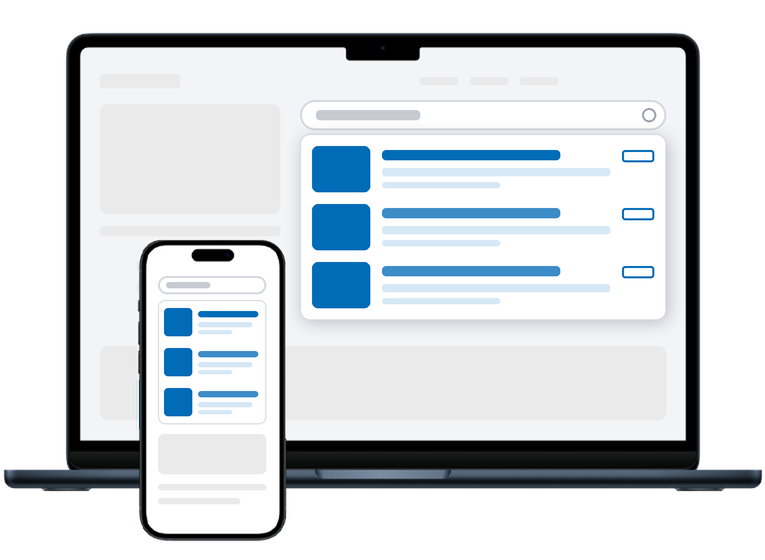
Search Ads show sponsored results in a website’s own search box, picked by what the visitor types. Someone types “hotel amsterdam” and sees hotel ads; someone types “running shoes” and sees running gear. The ads appear in a dropdown under the box, inside the site’s existing search suggestions, or as a results list in the page itself, as cards, compact suggestions or results styled like the site’s own.
Advertisers buy Search Ads as their own campaign type with keyword targeting, and a built-in blocked-term list keeps ads away from searches that should not have them. Try the live Search Ads demo or read the Search Ads guide.
Documentation
Set it up step by step in the GoAdserver documentation: Ad zone types and every ad format and its settings.