
In-Image Ads
In-image ads put a banner on the photos your articles already have. When a large photo scrolls into view, a strip with an ad slides along its bottom edge, labelled and closeable. You earn from images that carried nothing before, without adding a single slot to your layout.
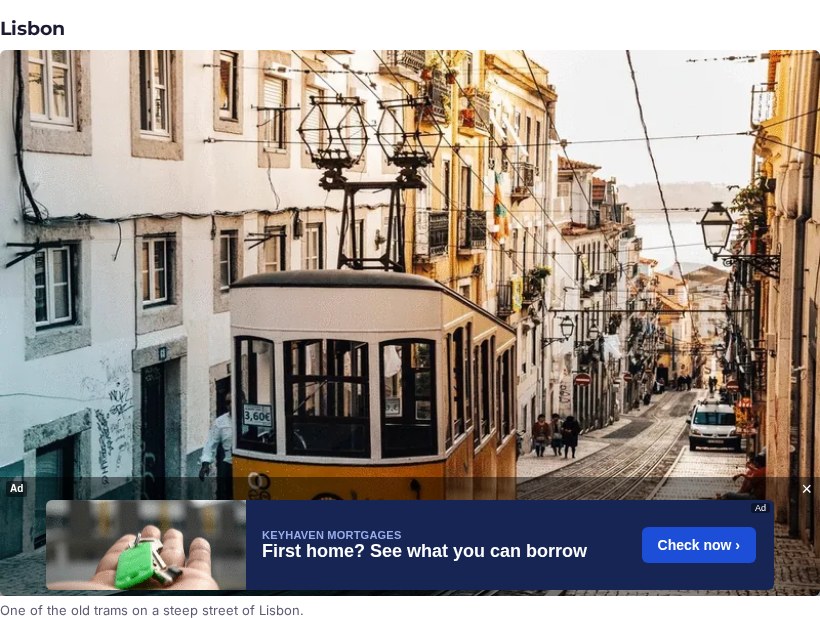
How in-image ads work
In-image is a display option of an ordinary inline banner zone. Switch on Show in-image and the zone code loads the in-image plugin of the goCtrl ad tag instead of the plain banner one. Put that code anywhere on your article pages; it needs no placement div.
- The plugin looks for large photos in your article: at least 400 pixels wide by default, up to three per page.
- Each photo asks for its ad only when half of it is on screen, so a reader who never scrolls down never loads the ads further down.
- The banner appears in a strip over the bottom of the photo, with an Ad label and a close button.
- Your page markup is not changed: the strip is placed over the photo, the image itself is not wrapped or moved.
Ads that match the picture
The photo’s alt text, or its caption, is sent with the ad request as keywords. Campaigns that target keywords can therefore follow what the picture shows: a beach photo can carry a hotel ad, a photo of a running track a shoe ad. Campaigns without keyword targeting fill the rest, exactly as on any banner zone.
Sizes and settings
Use a wide, low banner size: 728 × 90 or 468 × 60 for desktop pages, 320 × 50 for phones. A photo narrower than the banner gets no strip, so on a mobile site use a 320 × 50 zone. The zone code has four settings you can change in the code itself:
container: the CSS selector of your article; empty uses the page’s article element, then its main content.min_width: the smallest photo that gets a strip (400 pixels by default).max_images: the most strips on one page (3 by default).label: the ad label shown in the strip.
Any banner campaign in the zone’s size fills it, so advertisers need no special creative. Every strip counts one impression, like a normal banner. The step-by-step setup is in the publisher manual under banner ad zones.
When to use in-image ads
- Photo-heavy sites: travel, food, cars, real estate, fashion and news.
- Pages where adding more banner slots would push the content down.
- As an extra placement next to the banners you already run on the publisher ad server.
Compare the other formats on all ad formats, or try every one of them on the live demos.