
Dynamic Banners
Dynamic banners turn a shop’s product feed into display ads. The advertiser adds the feed once and picks a layout; every product in stock becomes a banner with its photo, name, price and a button, in the banner size the campaign needs. When a price changes the banner is redrawn, and when a product sells out its banner pauses.
With retargeting switched on, a visitor who looked at products in the shop sees banners of exactly those products on the sites in your network. Try the live dynamic banners demo.
How dynamic banners work
Dynamic banners build on product feeds. The advertiser points a banner campaign at the Google Merchant feed their shop already produces for shopping ads, or at a CSV file with the same columns. GoAdserver reads the feed on a schedule (every hour, every six or twelve hours, or once a day) and draws each product into a banner. New products get a banner, changed ones are redrawn, sold-out or removed ones are paused, and they come back when the product does.
The banners are drawn when the feed is read, not when an ad is requested. To the ad server they are ordinary HTML banners: they are cached, selected and served at full speed, they compete in the same auction as every other banner, and each click goes through the ad server to the product page and is counted.
Layouts and sizes
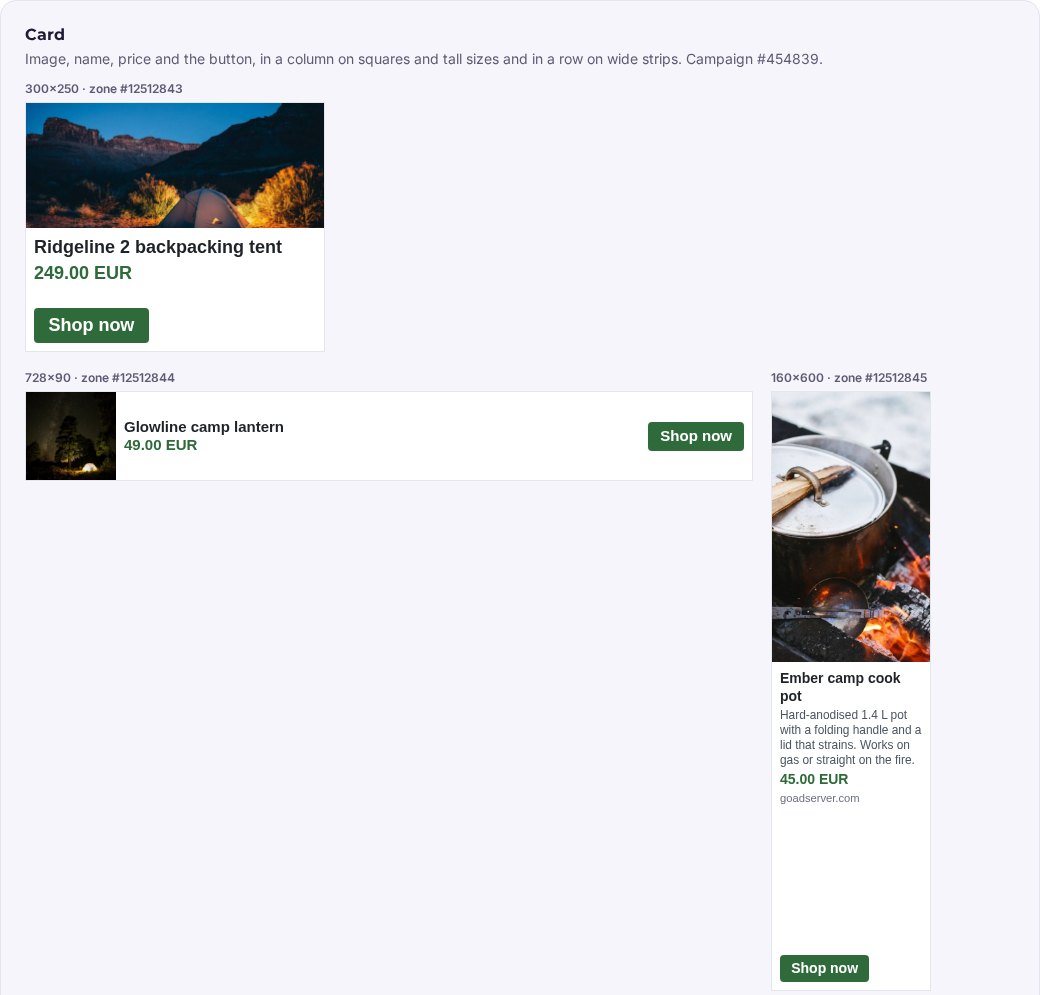
Three ready-made layouts adapt to the shape of the banner: wide strips such as 728×90 and 320×50 put the photo, the text and the button in a row, while squares and skyscrapers stack them.
- Card: the product photo, the name, the price and a button.
- Overlay: the photo fills the banner, with the name, price and button on a dark band along the bottom.
- Minimal: mostly text, with a small photo where there is room.
The advertiser chooses the button text and its colour and sees a live preview while setting it up. For another size, the same feed is simply added again with that size. Advertisers with a designer can also upload their own HTML template, with placeholders for the title, price, image, description, shop name and button that are filled in for every product.
Showing visitors the products they viewed
Most shops already have a retargeting pixel on their pages. Adding the product id to that pixel on the product pages is all it takes: the ad server remembers which products a visitor looked at, for 30 days. When that visitor later sees a banner from a feed with retargeting switched on, the banner shows the products they viewed instead of a random one from the catalogue. Visitors who viewed nothing still see the whole range, so the same campaign also brings in new customers.
The preference applies only to the advertiser’s own products and works on the visitor’s browser, address and language; nothing is shared between advertisers.
Why networks offer it
- Shops with hundreds or thousands of products get display campaigns without designing a banner per product.
- Banners always show the current price and never a sold-out product.
- Retargeting on viewed products is one of the best converting kinds of display advertising, and it runs on your own inventory.
- Everything is available in the panel and through the API, so agencies and shop platforms can set feeds up automatically.
Set it up
In the advertiser panel, open Feeds, tab Product catalogues, and add a feed: choose a banner campaign, paste the feed address, pick a layout, a banner size, the button text and colour, and switch on retargeting if you want it. The first sync runs right away. See the live demo with one feed in three layouts and three sizes, and the retargeting example, or look at all ad formats.
Frequently asked questions
What is a dynamic banner?
A banner that is drawn automatically from a shop’s product feed. Every product in stock becomes a banner with its photo, name, price and a button, in the size the campaign runs, and it is redrawn when the product changes and paused when it sells out.
What does an advertiser need to start?
A banner campaign and the product feed their shop already makes for Google Shopping, or a CSV or TSV file with the same column names. Each product needs an id, a title, a link and an image; a feed can hold up to 5,000 products.
How do visitors see the products they viewed?
The advertiser adds the product id to the retargeting pixel on their product pages and switches on retargeting for the feed. For 30 days, a visitor who viewed products from the feed sees those products first; everyone else sees the whole range.
Documentation
Set it up step by step in the GoAdserver documentation: Product feeds and dynamic banners and Creating a campaign.