
Social Bar Ads
A social bar shows ads inside your page as messages: a chat bubble from a brand, an incoming call or an app notification. Readers notice it the way they notice a new message, without a permission prompt and without subscribers. In GoAdserver it is a style of the native web push zone, filled from your native campaigns. Try the live demo.
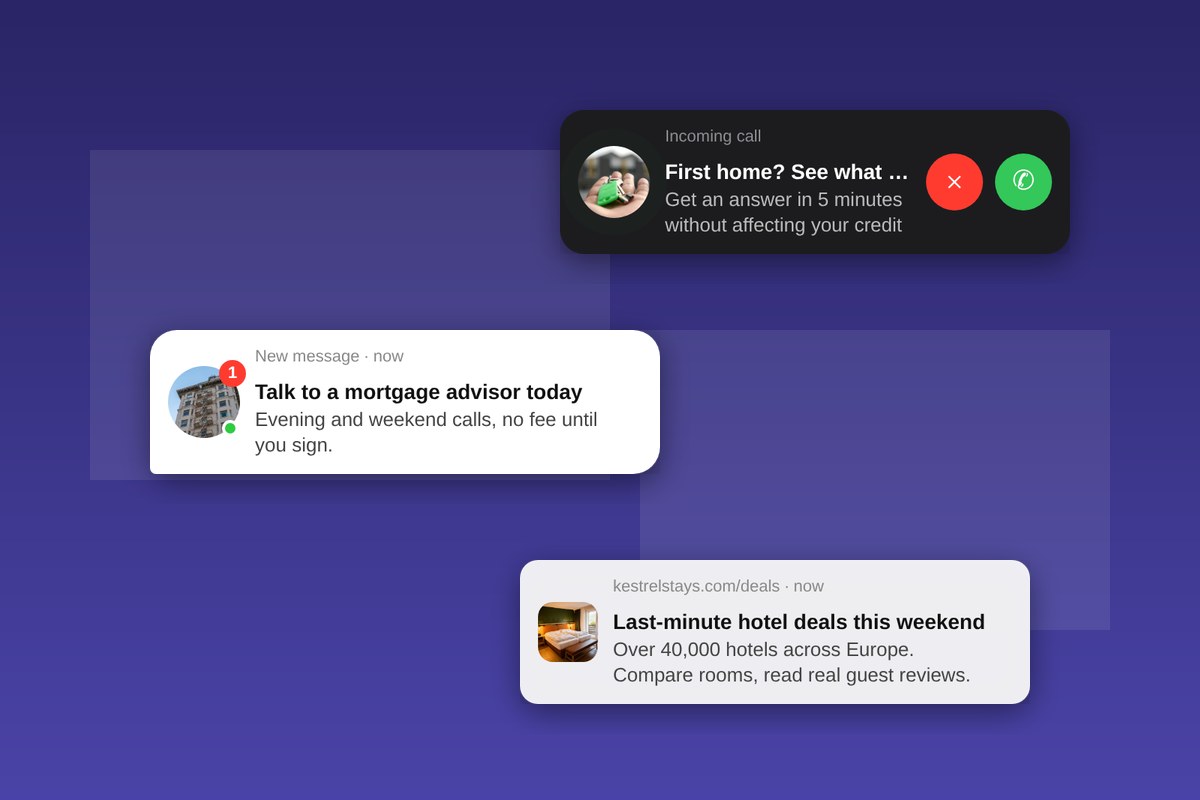
Three styles, one zone type
- Chat message: a messenger-style bubble with an unread badge and an online dot, the brand’s image as the avatar and the ad copy as the message.
- Incoming call: a dark call card with a ringing avatar. Answer opens the advertiser, Decline closes the card.
- System notification: a light alert in the style of an app notification, with the advertiser’s domain, title and text.
The classic notification card stays available, with your own colours and font. You pick the style per zone, so one site can run a chat message on articles and a notification on the home page. Each style runs live, with real ads, on the social bar demo.
Set it up in a minute
- Create a Native WebPush ad zone for your site.
- Pick a style: chat message, incoming call, system notification or the classic card.
- Choose where and when: a corner of the screen, how many messages show at once, and a delay of up to two minutes before the first one arrives.
- Paste one line of code on your pages with the goCtrl ad tag. The messages position themselves; no placeholder in your layout.
Every setting is in the native ad zone documentation, and the same options are in the API for automated setups.
Why publishers add a social bar
A social bar adds an ad unit without taking space in your layout and without asking visitors for anything. Because it looks like a message, it gets attention a banner no longer gets, and because it is a native zone it fills from the same campaigns as your other native placements: advertisers need no new creatives. A short start delay lets the visitor read first; every message can be closed with one tap.
For ad networks
If you run an ad network, the social bar is one more format to sell under your own brand on a white-label ad network. Advertisers buy it on CPM, CPC or CPA with the targeting of every other native format; publishers switch it on per zone. It sits next to the other notification-style formats of the push ad server and the full list on the ad formats page.
Frequently asked questions
Is a social bar a browser push notification?
No. It is shown inside your page, so there is no permission prompt and no subscriber list. Real browser notifications are a separate format, push ads.
Do advertisers need special creatives?
No. The social bar fills from native campaigns: an image, a title, a short text and the landing page.
Can visitors close it?
Yes. Every message has a close control, and the call card has a Decline button.
Does it work on phones?
Yes. The messages are sized for phone screens and stay in their corner while the visitor scrolls.
Want it on your own traffic? Talk with our team.