
Most publishers work with more than one ad network, but each placement usually sells to just one of them, chosen once and rarely checked again. SmartZones change that: several networks are connected to the same ad zone, GoAdserver compares what each actually pays per country and device, and every request goes to the network that pays best for it.
What is a SmartZone?
A SmartZone sits inside one of your existing ad zones and holds an outside network's ad code: an iframe or tag URL, a raw HTML/JavaScript snippet, or a VAST tag for video. When a request arrives, GoAdserver can serve that network's code instead of a local campaign. Put several SmartZones on the same ad zone and the networks compete for it.
How SmartZones decide
- Earnings data: GoAdserver pulls each network's statistics through its API and calculates the real eCPM, the revenue per thousand impressions, per country, and optionally per country and sub-ID.
- Ranking: for each request the best-paying SmartZone for that visitor's country wins; a margin or percentage setting controls how decisively the leader is preferred.
- Exploration: a small share of traffic (1% is a good start) keeps going to the other networks, so their eCPM stays measured and a network that improves can take over.
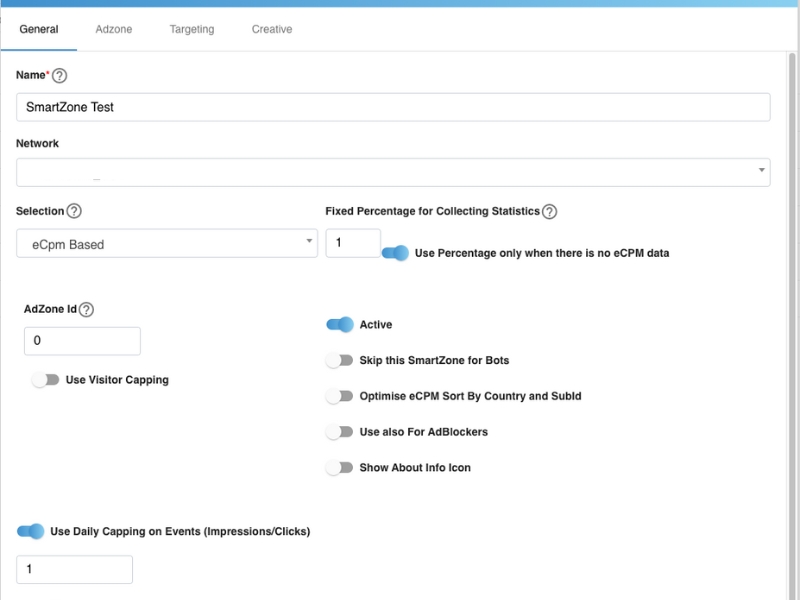
- Rules: each SmartZone can be limited to countries and device types, capped per day, kept away from bots, and skip pages through Referrer Stopwords.
Set up SmartZones
The documentation has the full walkthrough: How to set up a SmartZone.
- Connect your networks. Open Smart Zones → Networks, add each network and enter its API key or login, then switch on Pull stats via API. Some networks only enable API access on request.
- Create a SmartZone. On the Smart Zones tab click Add zone, choose the website and the ad zone it lives in, name it, pick the network and the selection type, and set the percentage used for collecting statistics.
- Paste the network's code: a URL, an HTML snippet or a VAST URL.
- Target it to countries and device types if needed, save and switch it active.
- Repeat for each network that should compete on that placement.
Measure the result
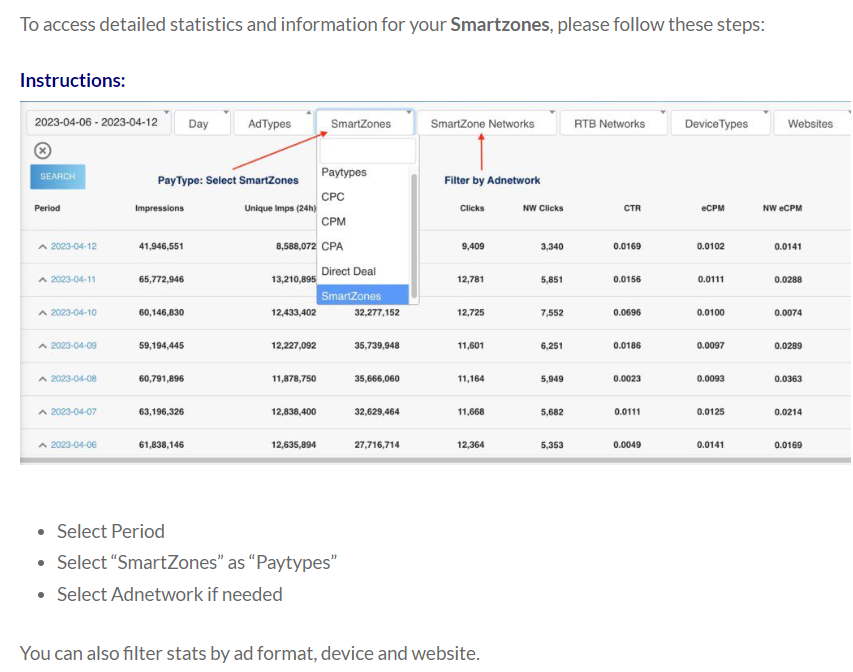
The Stats tab shows views, clicks and earnings per SmartZone over any period, filtered by network, ad format, device and website. Distribution shows how traffic and revenue split between networks over time, with eCPM and share.
An example
Your US traffic earns more with Network A, while Network B pays better in Brazil and on mobile. Without SmartZones you pick one and lose on the rest. With SmartZones each country goes to its best payer automatically, and when Network B raises its rates in the US, the statistics pick it up and the traffic follows.
Best practices
- Connect the API for every network. Without the network's own earnings data, eCPM can't be measured accurately and the ranking is guesswork.
- Keep exploring. Leave a small percentage (around 1%) for collecting statistics on the networks that are not winning, so a network that improves can take over.
- Start with two or three networks per placement. More networks need more traffic before their eCPM is reliable.
- Check Distribution weekly. It shows which network takes which share of traffic and revenue, and whether that is changing.
- Respect each network's policy. Use country and device targeting and Referrer Stopwords so each network only gets traffic it accepts.
- Let AdScanner check what networks serve on your pages, so a network that starts serving bad ads is caught quickly.
Frequently asked questions
Do SmartZones replace my own campaigns?
No. SmartZones sit inside your ad zones next to your own campaigns and direct deals. They fill the traffic you decide to send outside, at the best price available.
Which ad formats work with SmartZones?
Anything an outside network delivers as a URL, an HTML/JavaScript tag or a VAST tag: banners, native, video and more.
What if a network has no API?
The SmartZone still serves, but its eCPM can't be measured from the network's own figures, so it competes less accurately. Ask the network to enable API access; many do so on request.
Related
SmartZones work alongside your own campaigns, direct deals and RTB demand. See the SmartZones feature page, how to monetize your websites, and how to keep pop revenue when browsers block pops.