
Clients and partners want to see how their campaigns perform, but giving them an account is often too much and exporting spreadsheets every week takes time and goes out of date immediately. Shared reports solve this: you choose the statistics to share, GoAdserver creates a unique link, and anyone with the link sees the live numbers without logging in.
What is a shared report?
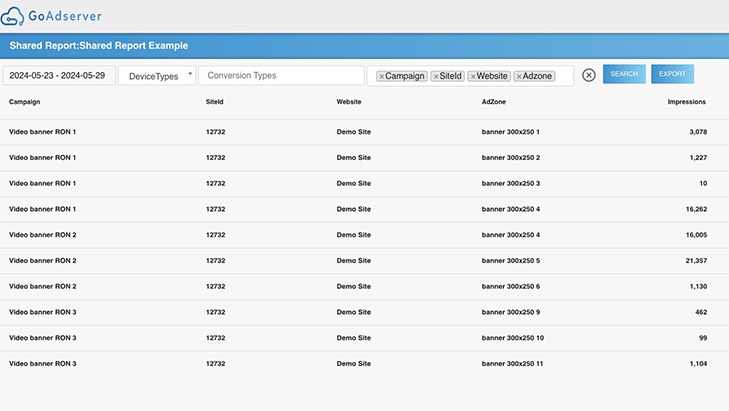
A shared report is a saved statistics view (campaigns, period, filters and breakdowns) published at its own URL. It shows live data: impressions, clicks, CTR, conversions and costs, with the filters you applied. Recipients can only see what you put in the report, nothing else in your account.
How to create one
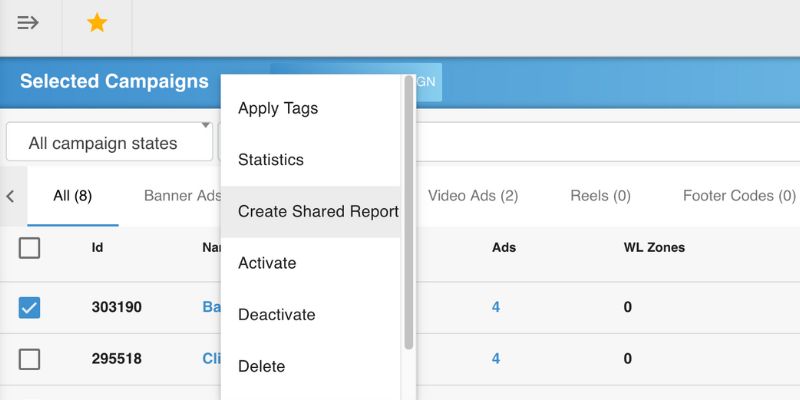
- Start from your data: select one or more campaigns in the campaign list, or (on ad manager setups) one or more sites in the publisher site list, or open the advertiser statistics with the filters you want.
- Choose the filters: period, device types, conversion types and any advanced filters.
- Create the shared report. GoAdserver generates a unique URL for it.
- Send the link to your client or partner.
Why use shared reports
- No accounts needed: recipients open the link and see the numbers.
- Always current: the report shows live data, not last week's export.
- Only what you choose: the report is limited to the campaigns, sites and filters you selected.
- Reusable: saved filters become a standard report you can send again and again.
- Less work: no more weekly spreadsheets or screenshots.
Who uses them
- Agencies showing clients how their campaigns perform.
- Ad networks reporting to advertisers and to the buyers of direct deals.
- Publishers sharing placement results with partners, including push buyers.
- Media buyers sharing results with affiliates and offer owners.
Managing your shared reports
All your shared reports are listed in one place. You can edit a report's campaigns and filters (the link stays the same, so recipients see the change), switch a report off to stop the link working without losing its settings, and delete it when the collaboration ends. Use one report per client or partner, so you can switch off one link without affecting the others. Tracker users have the same feature for their tracking statistics.
Shared reports, scheduled emails or the API?
| Option | Best for |
|---|---|
| Shared report link | Clients and partners who want to look whenever they like, without an account. |
| Scheduled report email | People who want a summary delivered to their inbox on a schedule. |
| API | Partners who want the numbers in their own systems, dashboards or spreadsheets. |
Tips
- Name each report after the client and campaign, so you can find it later.
- Share only the metrics the recipient needs; leave internal costs out of reports for advertisers.
- Pick a period that matches the deal, for example the current month for a monthly flat-rate deal.
- Switch reports off when a campaign ends, instead of leaving old links live.
Related
Shared reports build on GoAdserver's real-time statistics and performance tracking. For automated reporting you can also schedule report emails or pull statistics through the API, or connect an AI assistant through MCP. The step-by-step guide is How to share a report in the documentation.