
AI Chat Ads
AI chat ads place clearly labelled ads under an AI assistant’s answer, matched on what the visitor asked and what the assistant replied: an ad card, a row of product cards with prices, or a sponsored follow-up question the visitor can ask next. Ads appear only after the answer has finished, and conversations on sensitive topics never get an ad. It works in a chat widget on your site with one line of code, and in any app through a simple JSON API. See AI chat ads live.
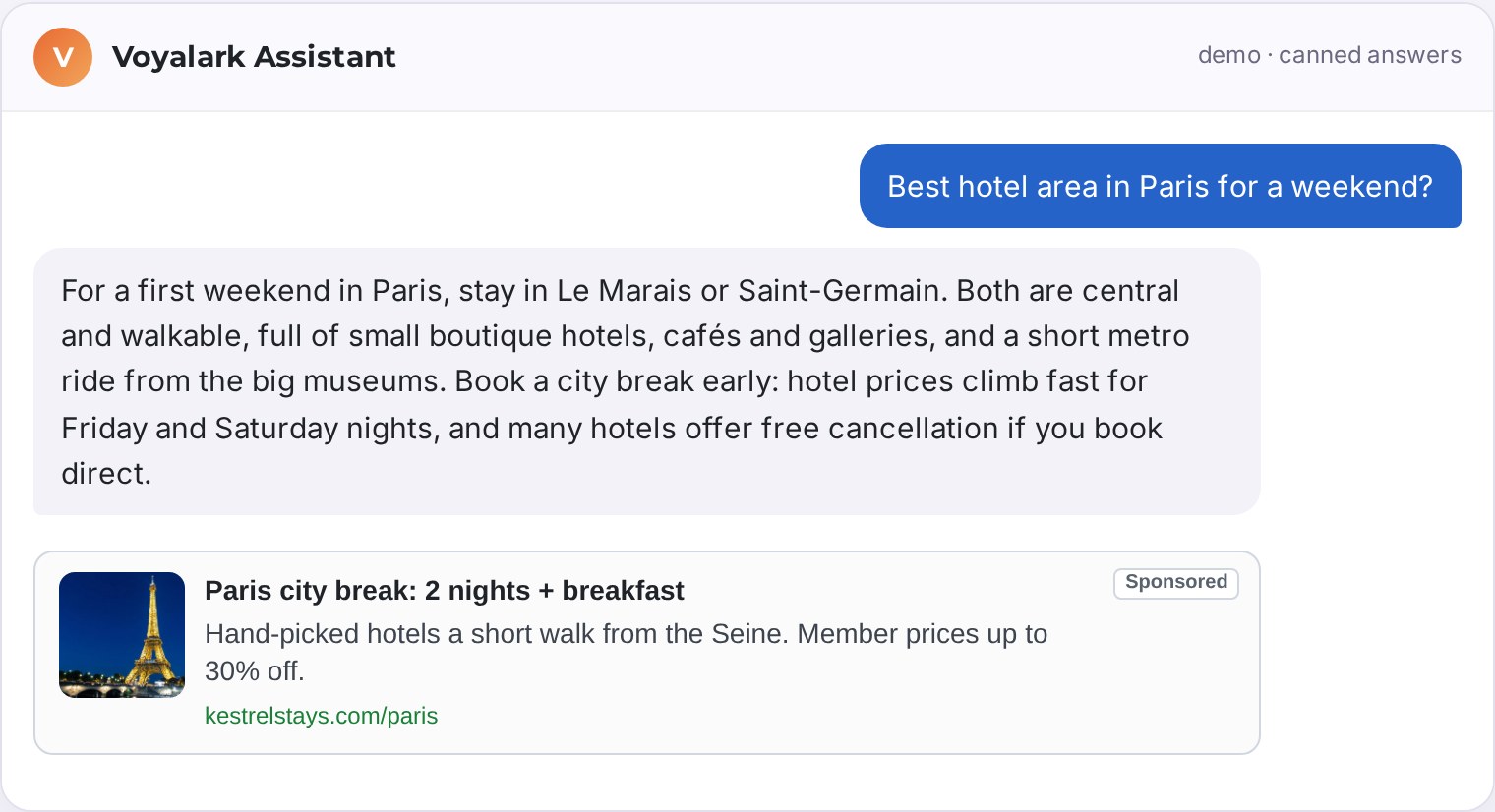
How AI chat ads work
When a visitor asks your assistant something, the conversation itself says what they are looking for. AI chat ads use that: once the answer has finished, the question plus the start of the answer is looked up the way a search would be. Campaigns that target a matching keyword are candidates, and the best one is shown as a card under the answer: image, title, short description and the advertiser’s address, with your own label, such as Sponsored.
- The ad never interrupts the answer: it appears only when the answer is complete.
- The impression is counted when at least half of the card is on screen, not when it is requested.
- A click goes through the ad server to the advertiser, so clicks and conversions are tracked like any other ad.
- You choose to show an ad after every answer, or after every 2nd, 3rd or later answer.
Sponsored follow-up questions and product cards
Besides the ad card, a chat zone can show two more kinds of ad under the answer.
- Sponsored follow-up questions. An advertiser can add one follow-up question to an ad, such as Which Paris hotels include breakfast? It appears as a labelled chip under the answer. When the visitor picks it, your assistant is asked that question and the pick counts as the ad’s click. You choose 0, 1 or 2 follow-ups per answer.
- Product cards. For shops and product catalogues, the zone shows a row of two to four product cards with image, name and price. Advertisers fill them with a product feed: every product in stock becomes an ad, with its current price.
Both are plain ad fields and zone settings, so they work in the chat plugin and in the JSON API alike.
Safe by default
Every turn is checked against the built-in blocked-term list, the question and the answer both. Words about minors, non-consent or violence never get an ad, and each publisher can add their own blocked terms on top, for example to keep ads away from medical or financial advice. The check runs on the ad server, so it applies whether the ad is requested by the chat plugin or by an app.
For chat widgets and for apps
On a website, the goCtrl ad tag watches your chat widget: you tell it which element holds the messages, which ones are the assistant’s answers and which are the visitor’s questions, and it does the rest. No server needed: there is nothing to install and no backend to change. It all runs in the visitor’s browser, like any other ad zone, and the chat itself stays untouched. Paste the zone code next to your chat widget and you are done.
Only an app without a web page needs the server route. An app that draws its own interface, such as a mobile app, a voice assistant or a chat on another platform, calls the ad server directly with the question, optionally the answer, and the number of ads it wants (1 to 4). It gets JSON back with each ad’s title, description, display address, image, click address and impression address, plus the label to show, and, where the advertiser set them, a sponsored follow-up question and a price. A picked follow-up is counted with its own click address, without sending the visitor away. The app passes the visitor’s IP address and user agent so that country and device targeting see the visitor, not the app’s server.
Built on Search Ads
AI chat ads are a mode of the Search Ads zone. Advertisers buy one keyword-targeted Search Ads campaign and reach people in a publisher’s search box, in in-text links and in AI chat answers, with the same keywords, bids and reports.
Set it up
- Create a Search Ads zone and set Where the ads show to AI chat.
- For a chat widget, enter the chat container, the answer selector and the question selector, choose how often an ad shows, pick the ad style (one ad card, or a row of product cards) and how many sponsored follow-up questions to show, and paste the zone code once per page. For follow-ups, also enter the chat’s text box, so a picked question is asked for the visitor.
- For an app, call the chat ad endpoint with the zone id and show the ads it returns.
Every setting is also available in the API, so the zone can be created and changed by your own tools. Try it first on the live demo, and see the other ways to place ads on a page under ad formats.